
Solution Architecture Document — TBH Editor
Project: TBH-Editor — browser-based, transcript-driven podcast editor Author: Jarrod E. Brown Platform: Cloudflare (Workers + Durable Objects + R2 + D1 + Workflows + Workers AI + Containers) Status: v2 architecture — full design specification Repository: Private
Web
- Live site: editor.thebrokenhandle.com (access-gated)
1. Overview
TBH Editor is a browser-based podcast editor whose editing surface is the transcript: you edit audio by editing text, and the media follows. It is built entirely on Cloudflare — a Workers API, Durable Objects for the live edit session, Workflows for long-running transcription and render, Workers AI and an external ASR vendor for transcription, R2 for media, D1 for metadata, and a CPU container running ffmpeg for ingest, mastering, and export.
This document describes the v2 architecture, an evolution of a shipped v1. v1 proved the end-to-end workflow (upload → transcribe → transcript-edit → export) on a Durable-Object edit document. v2 keeps that spine and re-grounds the system on two structural ideas that close both the “feels slow/janky” problems and the recurring partial-state bugs that plague cloud-canonical editors:
- One source of truth: an immutable source-media set plus a single, reversible, append-only edit document. Every view — preview, export, transcript, captions — is a pure, cacheable function of
(sources, edits). Nothing is destructively mutated; nothing is inferred from a side-effect. - A hard split between an interactive, frame-dropping preview and a deterministic, parallelizable final render. Editing and preview are local-first for responsiveness; the cloud is for durability, heavy/long renders, and AI — never in the critical path of “can I scrub and edit right now.”
Layered on top is a single-pass core (decode each source once into a canonical intermediate and analyze once into a content-addressed sidecar) and a reliability spine (explicit state machines, idempotent operations, durable workflows, loud failures) that together make whole classes of failure structurally impossible rather than merely fixed once.
Scope of this document. This SAD specifies the complete target architecture for the system as designed: a transcript-driven editor for audio and video, local-first capture that never loses a take, collaborative editing (optimistic local edits with a path to conflict-free multi-user merge), the single-pass core, and the reliability spine. Delivery is sequenced as a phased plan (§18) — audio capability first, video parity later — but every component below is part of the designed architecture, independent of the order in which it is built.
2. Problem & Context
Editing a two-host podcast in traditional DAWs is slow and not collaborative. The hosts record, then one person takes the file offline, edits in Audacity or Logic, and sends a bounce back for review. Feedback cycles are asynchronous and lossy — “cut that section around minute 12” is imprecise, and the editing host carries the full cognitive load of mapping notes to waveform positions.
Descript-style transcript editing is the desired workflow — you read and edit a document and the audio follows — but commercial tools are subscription-bound ($24–33/month per seat), not self-hostable, and not tunable to a two-person workflow. They also carry a recurring set of failure clusters that drive churn: lag and freezing on long projects, transcript/audio drift, export failures, lost takes, and a forced cloud-online dependency.
TBH Editor delivers transcript-driven editing on infrastructure the team already runs for The Broken Handle podcast. The v2 design adopts the transcript-as-edit-list model but pairs it with local-first responsiveness, deterministic render, and a reliability spine — directly neutralizing the top complaint clusters of the commercial tools.
3. Goals & Requirements
Functional
- Import or record audio and video (WAV, MP3, M4A, FLAC; video sources for the video phase), transcribe it, and edit by editing the transcript.
- Local-first capture that survives a tab crash or network drop — no take is ever lost.
- Multitrack, per-host transcription — one mic per host means each track is a single known speaker, so speaker labels are deterministic (by track) rather than guessed.
- Non-destructive edit model: sources are immutable; edits are a reversible, append-only document.
- Collaborative editing — optimistic local edits with background sync, with a designed path to conflict-free concurrent multi-editor merge.
- Deterministic export with edits applied (MP3/WAV for audio; video export in the video phase), with selectable loudness targets.
- Mastering pass (leveling, loudness normalization) on the final program.
- Project management: create, list, archive, and delete projects; each project holds multiple tracks.
Non-functional
- Fully Cloudflare-native; serverless except the CPU container for media work.
- Authenticated access restricted to the host team (Cloudflare Access).
- Large media never buffers through the edge Worker — bytes move browser↔R2 and container↔R2 directly via presigned URLs.
- Resilient long-running transcription and render via managed Workflows with checkpointing and retry.
- Every asset and job has an explicit, persisted state; every failure is loud (an explicit
failedrow with a reason), never a silent drop. - Schema and config are CI-enforced contracts applied identically to every environment.
4. Decision Rationale
Why Cloudflare? The Broken Handle already runs its website, research pipeline, and media on the Cloudflare developer platform, so a single account consolidates billing, DNS, and deployment. The technical drivers: Durable Objects give a single-writer, globally consistent coordination primitive that maps directly to the “authoritative edit document” pattern. R2 gives S3-compatible object storage with zero egress fees, which matters for a media-heavy app. Workers AI gives on-platform Whisper without managing GPU infrastructure. Containers give a managed runtime for CPU-bound ffmpeg work. Workflows give durable, checkpointed orchestration for transcription and render. The alternative — AWS (Lambda + DynamoDB + S3 + ECS) or a VPS — would mean stitching together more services, managing cross-service auth, and paying egress on every playback.
Why a single source of truth with pure derivations? The recurring failure mode of cloud editors is divergence between what you see and what you export, and brittle alignment that drifts over a long project. v2 represents the project as immutable sources plus a reversible edit document, and makes preview, export, transcript, and captions derivations at different fidelities, each memoized on hash(source_content_hash + normalized_edits + format). An edit at t=30s invalidates only the overlapping render segment. Time is rational ({value, rate}, never floats) to eliminate the drift that forces “fix alignment” passes.
Why split preview from final render? Responsiveness and correctness have different masters. Preview runs at proxy resolution with audio as the master clock, dropping video frames if needed — glitches in audio are far more perceptible than a dropped frame. Final render is deterministic (virtual clock, never drops), so server output exactly matches preview, and because each segment is a pure function of its time range, segments render in parallel and concatenate.
Why a single-pass core? Decoding and analyzing each source repeatedly (once per preview, per export, per master) is wasteful and a source of subtle inconsistency. v2 decodes each source once on import into a canonical PCM intermediate and analyzes it once into a content-addressed sidecar (word timings, waveform peaks, loudness/true-peak). Every downstream consumer reads the shared intermediate instead of re-deriving, so new features become thin consumers of a shared spine rather than new pipelines.
Why an external ASR vendor over Whisper-primary? Because recording is multitrack (one mic per host), each track is a single known speaker — so the system does not need diarization at all and labels speakers by track. That removes the speaker-mislabeling errors that are a top complaint of commercial tools. What matters then is word-error-rate and accurate word-level timestamps. At this volume (~10 hours/month) every option costs under a few dollars per month, so the choice is accuracy-first: an external vendor (AssemblyAI) that returns native word-level timestamps, which also removes the forced-alignment pass that Whisper-primary would require. Cloudflare Workers AI Whisper is kept as a zero-cost integrated fallback.
Why online-first optimistic editing, with a designed path to CRDT? The biggest responsiveness win is never blocking the UI on the network: edits apply optimistically to a local replica and sync in the background. For single-editor use that is sufficient and simple; for concurrent multi-editor use the same local op-log feeds a conflict-free replicated document (Yjs). Both modes share one document model, so multi-user merge is an additive layer, not a rewrite.
Why a non-destructive edit model? Podcast editing is experimental — cut a tangent, then keep it; try different section orders. A destructive model makes undo expensive and branching impossible. v2 stores edits as an ordered, reversible list against immutable source audio; “delete” is a tombstone, not a cut. The render reads this list to produce the output. This is the model professional NLEs use.
Why a reliability spine? A podcast tool cannot silently lose or mis-sequence work. The spine makes three failure classes structurally impossible rather than fixed case-by-case: (a) starting a job on a partial input — state transitions are gated, so transcription cannot begin until every track is verified-uploaded; (b) buffering large media in the edge Worker — a hard data-plane rule keeps bytes on presigned R2 paths; (c) environment schema drift — schema is a CI-checked contract applied to every environment by the same automation.
5. Architecture Overview
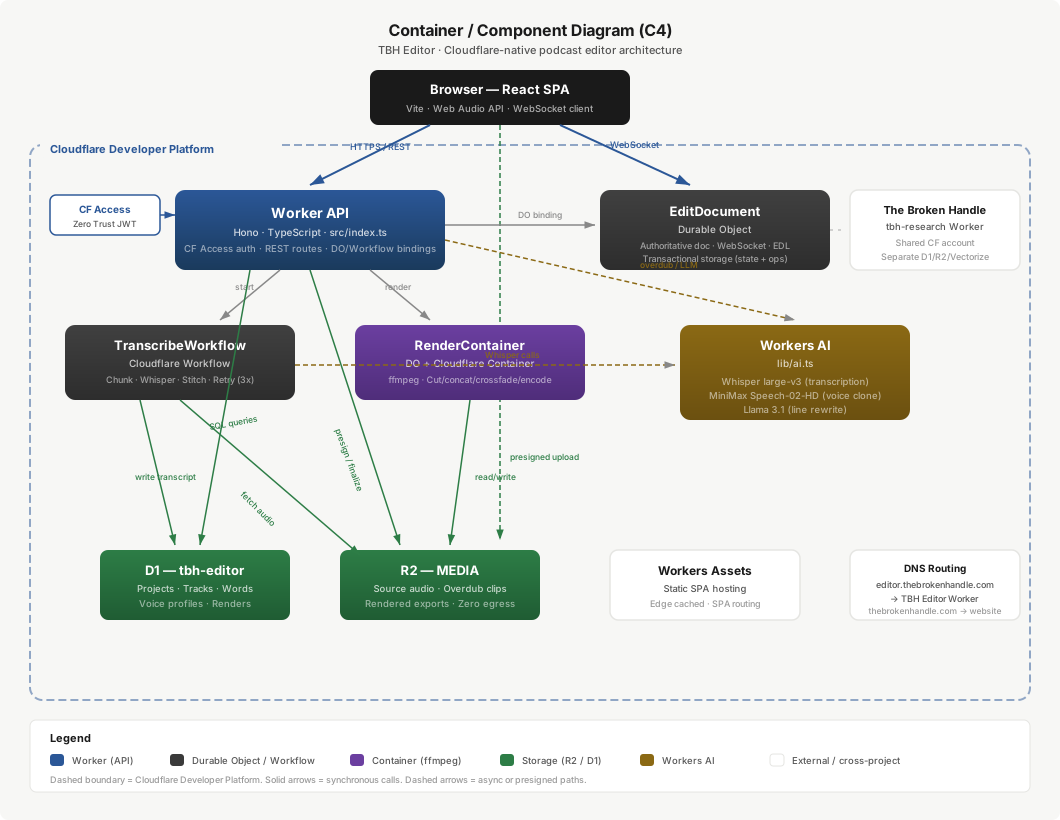
The system consists of a React SPA served via Workers Static Assets, a Hono-based Worker API that signs and orchestrates (never streams media), a per-project Durable Object that owns the live edit session, durable Workflows for transcription and render, a CPU container for ingest/master/export, an external ASR vendor with a Workers AI fallback, and the storage tier (R2 for media and analysis artifacts, D1 for relational metadata, DO SQLite for the live document).
6. Components
| # | Component | Responsibility |
|---|---|---|
| 1 | Frontend | React SPA (Vite, TypeScript): project list, transcript editor with script-style speaker margins, waveform timeline, playback, master/export controls. Talks to the Worker over REST and to the edit Durable Object over WebSocket. Served as Workers Static Assets with SPA routing. |
| 2 | Capture (local-first) | In-browser recording that writes each participant’s track to durable local storage (OPFS, persist()) before upload, with an ordered manifest and resumable background upload; a chunk is deletable locally only after server ACK. Crash recovery scans for an interrupted session on reload. The live call (Cloudflare Realtime SFU/TURN) is independent of capture, so a dropped call never costs a take. |
| 3 | Worker API | Hono application: Cloudflare Access authentication, route mounting, Durable Object and Workflow bindings, presigned-URL signing, and state-transition recording. Orchestrates everything; streams no large media through itself. |
| 4 | Edit document (Durable Object) | The authoritative live edit session per project. Holds the current document state and append-only operation log, accepts edits over WebSocket, applies them, and broadcasts. Persists to its embedded SQLite for durability across restarts. |
| 5 | Transcription Workflow | Durable, checkpointed orchestration of per-track transcription: gate on all tracks verified-uploaded → send each track to the ASR vendor via a presigned R2 URL → persist word-level transcript artifact to R2 and words to the store → push the transcript into the live edit document. Whisper is the fallback engine. |
| 6 | Render Workflow + Render Container | Durable orchestration of export. Splits the timeline into segments, fans out per-segment PCM render jobs to the ffmpeg container (presigned R2 in/out), concatenates in fixed order, runs a single final encode + loudness normalize, writes the result to R2. Content-addressed render cache short-circuits unchanged exports. |
| 7 | Ingest pipeline (single-pass core) | On track upload, a chained container pipeline runs once per source on a shared instance: probe (metadata sidecar) → decode to a canonical PCM intermediate → measure source loudness/true-peak → compute a waveform-peaks envelope. All artifacts are content-addressed in R2; nothing re-decodes the raw source downstream. |
| 8 | Mastering | Container-side mastering (leveling, loudness normalization to a selectable delivery target) on the joined program, with an external mastering API available as an alternative canonical master path. |
| 9 | REST routes | Handlers for projects (CRUD), tracks/uploads (presigned URL generation, multipart finalize, idempotent transcribe trigger), render/export, and master. |
| 10 | Schema & migrations | D1 schema and idempotent migrations, validated by a CI schema-contract check that gates deploys. |
7. Edit Model & Collaboration
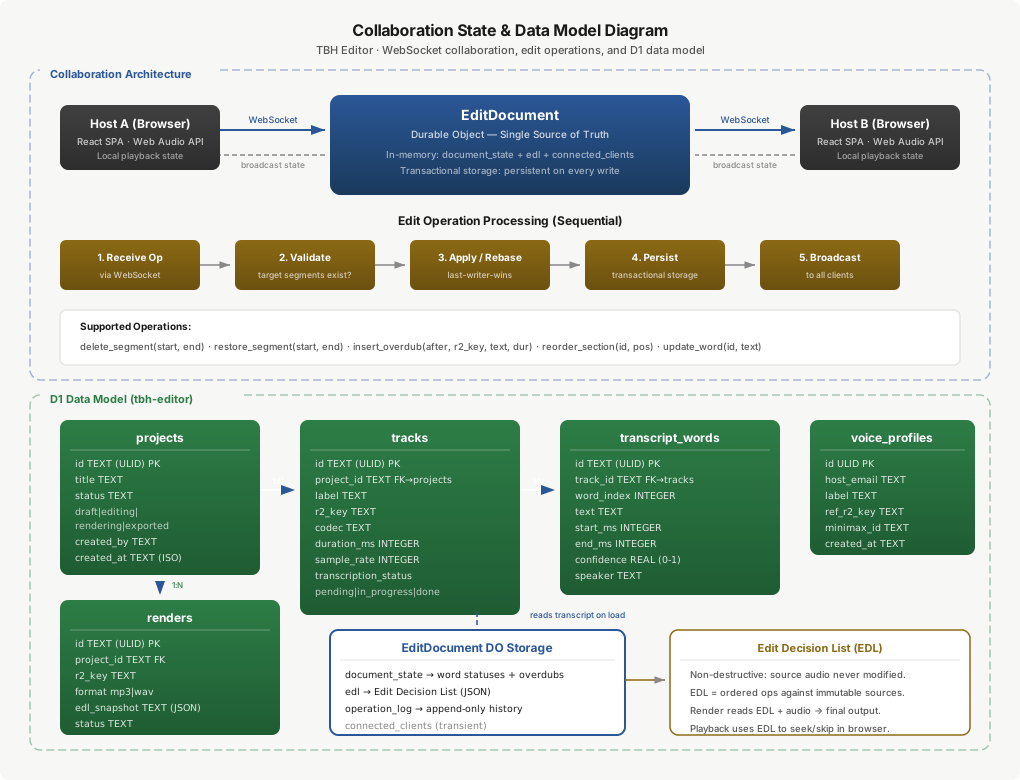
One document, derived views. A project is one event-logged document: immutable sources[] (keyed by id and content hash), a transcript whose words carry source-time timestamps and kept/ignored flags, a timeline of clips ({sourceId, source_range, record_pos, order}), and per-track and marker maps. Preview, export, transcript, and captions are pure functions of (sources, edits).
Two-layer, rational time. Following OpenTimelineIO, the model separates available_range (media that exists) from source_range (the trim in use). A trim changes only source_range numbers — the source is untouched. All time is rational ({value, rate}) to avoid floating-point drift. Transcript-driven editing is source_range editing at word granularity: each word is the join between text and media, and a delete is a reversible tombstone.
Edit operations. The editor applies a small set of reversible operations against the document — delete/restore a word range (soft tombstone, excluded from playback and render), reorder a section, and correct a word’s text (text layer only, no timing change). Every operation produces an entry in an Edit Decision List (EDL): an ordered, replayable description of how to reconstruct the output from the immutable sources. The EDL is the input to the render.
Collaboration model. The per-project Durable Object is the single authority for a project’s live session. Edits apply optimistically to a local replica for instant feedback and sync to the DO in the background; the DO persists the op log to its embedded SQLite and broadcasts to connected clients. If a connection drops, the client keeps its last-known state and re-syncs on reconnect. This online-first, optimistic model delivers instant edits without blocking the UI on the network.
Conflict-free multi-editor. The collaboration layer is designed for conflict-free concurrent editing using a CRDT (Yjs) hosted inside the same Durable Object over hibernatable WebSockets: clip reordering via a fractional index (never delete-and-reinsert), transcript↔clip anchoring via relative positions (so a clip’s word span survives concurrent transcript edits), and presence/cursors on an ephemeral awareness channel that is never persisted. One document holds transcript, timeline, and markers together so anchors resolve within it. The CRDT layers onto the same local op-log used for optimistic editing, so single-editor and multi-editor operation share one document model rather than two code paths.
8. Single-Pass Core
The ingest pipeline operationalizes “every view is f(sources, edits)” at the import layer. On upload completion, a chained, fire-and-forget pipeline runs once per source on a single shared container instance (one cold start for the whole chain):
- Probe → a content-addressed metadata sidecar (
{sampleRate, channels, durationMs, codec}plus the raw probe JSON) in R2, keyed by a hash of the source content. - Decode-once PCM intermediate → the source is decoded exactly once to a canonical 48 kHz / 16-bit / stereo WAV in R2 — the same normalization target the mix and render already use.
- Source loudness/true-peak → one analysis pass over the intermediate writes
{I, TP, LRA}into the sidecar, so delivery-preset selection later is a pure target choice with no re-measure. - Waveform peaks → a downsampled min/max envelope (200 buckets/sec) written to a sibling R2 object for server-side timeline rendering with no client-side decode.
Each step is content-addressed and idempotent (re-uploading identical bytes is a cache hit, no recompute), loud (a missing or zero-byte artifact throws rather than skipping silently), and data-plane pure (the source and intermediate move container↔R2 directly; only small metadata crosses the Worker). Consumers — preview, export, master — read the shared intermediate instead of re-decoding, each verified byte-identical to a fresh decode.
For video sources the canonical intermediate is a keyframe-dense proxy plus an I-frame index (the master is decoded once only at final encode), and the analysis sidecar additionally carries shot/scene boundaries, active-speaker hints, and reframing crop hints. Because every output is a policy over this shared context plus a single final encode, downstream capabilities — preview, export, transcript-to-video, social short-clips, captions, chapters — are thin consumers of the spine rather than independent pipelines.
9. Data Flow
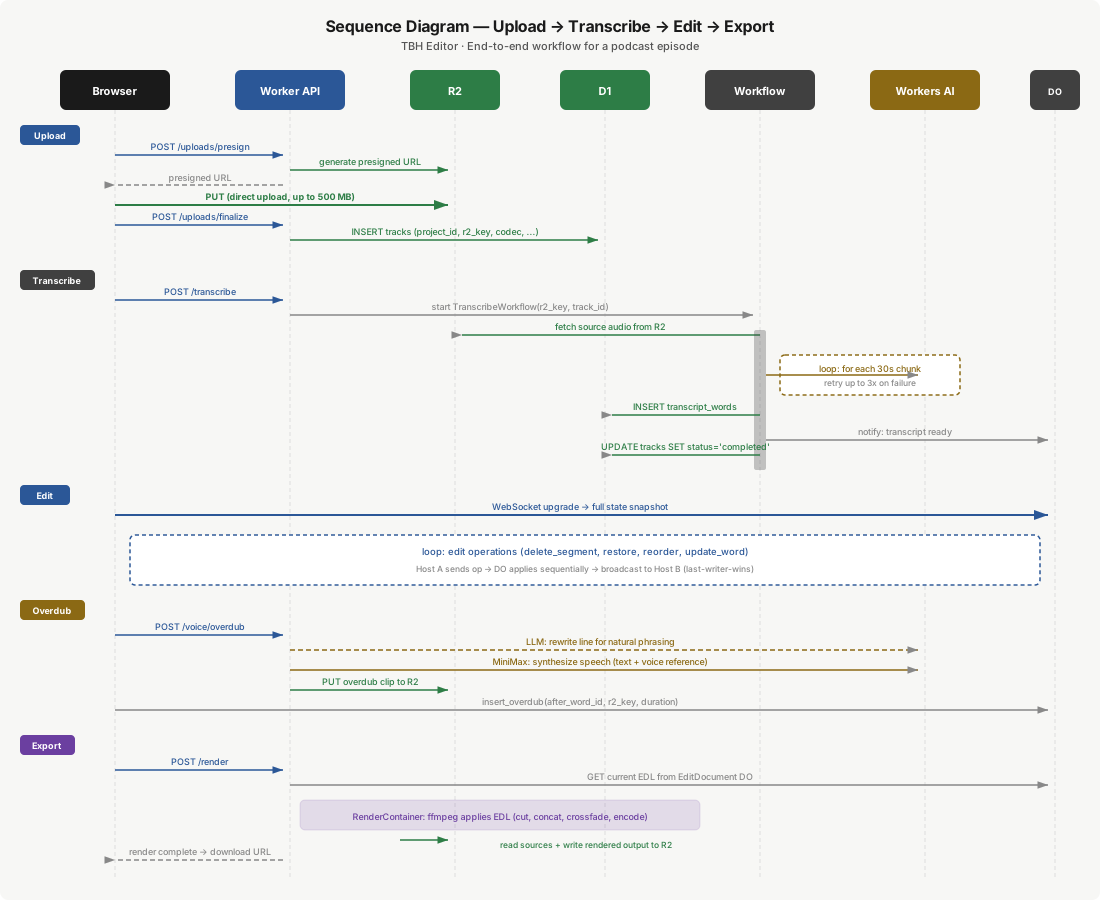
- Import / record. A host imports an audio file (or records locally first). The frontend requests a presigned R2 upload URL from the Worker, uploads directly to R2 (bypassing the Worker), then calls a finalize endpoint that verifies multipart completion + checksum and records track metadata. Verified completion is the gate for everything downstream.
- Ingest (single-pass core). Upload completion triggers the chained ingest pipeline (§8): probe → PCM intermediate → loudness → peaks, all once, all content-addressed.
- Transcribe. Once every track is verified-uploaded, an idempotent trigger starts the Transcription Workflow. Each track is transcribed whole by the ASR vendor via a presigned R2 audio URL — no chunking or resampling needed for accurate word timestamps — with per-track speaker labels assigned deterministically (one mic per host). The transcript artifact is persisted to R2 and pushed into the live edit document. Whisper is the fallback engine.
- Edit. The host opens the transcript as an editable document. Selecting words and deleting marks them excluded; corrections fix the text layer; sections reorder. Edits apply optimistically and sync to the Durable Object, which persists the op log and updates the EDL.
- Master & export. Export starts the Render Workflow: the timeline is split into segments, each rendered to PCM in parallel by the container (presigned R2 in/out), concatenated in fixed order, then a single final encode with loudness normalization to the selected delivery preset. A content-addressed render cache returns instantly if the exact
(sources, edits, format)was rendered before; otherwise the result is written to R2 and the download URL returned.
10. Data Model
Relational metadata lives in D1. The live edit state lives in the edit Durable Object’s embedded SQLite (single-writer consistency, sub-second reads/writes). Per-source analysis artifacts (intermediate, sidecar, peaks) live in R2, content-addressed.
projects — a podcast episode editing session: id, title, status (draft · editing · rendering · exported · archived), created_by (identity reference), and created_at/updated_at.
tracks — an audio file within a project (one per host).
| Column | Type | Description |
|---|---|---|
id | TEXT | Primary key. |
project_id | TEXT | FK → projects.id. |
label | TEXT | Display name (e.g., a host’s name). |
source_key | TEXT | R2 object key for the immutable source audio. |
source_hash | TEXT | Content hash — the key for the analysis sidecar / intermediate / peaks. |
codec / sample_rate / channels | — | Source format metadata. |
duration_ms / file_size_bytes | INTEGER | Duration and size. |
upload_status | TEXT | uploading · uploaded (verified) · failed. |
transcription_status | TEXT | pending · in_progress · completed · failed. |
transcript_words — words with timestamps, the atomic unit of transcript editing (track_id, word_index, text, start_ms, end_ms, confidence, and a per-track speaker label).
jobs / idempotency_keys / outbox — job rows with explicit status, a unique-constraint dedup table that makes retries and double-clicks safe, and a transactional outbox so a state change and its enqueued work commit together.
renders — completed export records (project_id, r2_key, format, duration_ms, file_size_bytes, edl_snapshot frozen at render time, loudness_target, status, timestamps).
Live edit state (DO SQLite). Append-only doc_updates (the op log), periodic snapshots for fast cold-start, and transient awareness (cursors/presence, not persisted).
11. External Interfaces
| Interface | Provider | Purpose | Auth | Constraints |
|---|---|---|---|---|
| ASR (primary) | AssemblyAI | Whole-file speech-to-text with native word-level timestamps; per-track, no diarization needed | API key (Worker secret) | Source fetched by the vendor via a presigned R2 URL |
| ASR (fallback) | Cloudflare Workers AI — Whisper | Integrated, zero-cost transcription fallback | Platform binding | ~720 req/min; resampling/alignment handled in pipeline |
| Object storage | Cloudflare R2 | Sources, intermediates, analysis sidecars, peaks, render outputs | Worker binding; presigned URLs for direct transfer | Zero egress; multipart for large uploads |
| Relational metadata | Cloudflare D1 | Projects, tracks, words, jobs, renders | Worker binding | 10 GB per-database cap (sharded if needed) |
| Authentication | Cloudflare Access (Zero Trust) | Restricts access to the host team | JWT validation middleware | Policy-based |
| Media processing | Cloudflare Container (ffmpeg) | Ingest, segment render, master, encode | Internal (Worker/DO ↔ container) | CPU-only; bytes via presigned R2 |
| Mastering (optional) | External mastering API | Canonical master alternative (leveling, normalization) | API key (Worker secret) | Runs on the async data-plane path |
12. Reliability Spine
The spine is what turns “fixed this time” into “cannot happen”:
- Explicit asset/job state machine with a single guarded
transition(from→to); scattered status updates are banned. Transcription cannot begin until every track has independently reached verifieduploaded. uploadedis gated on verified completion (multipart complete + full-object checksum); downstream work subscribes to the state transition, not to a raw object-created event — so “process before upload finished” has no event to fire on.- Idempotency keys (unique-constraint dedup) make retries and double-clicks safe.
- Transactional outbox commits a state change and its enqueued job in the same transaction — no partial state.
- Durable Workflows with checkpointed, retried steps; dead-letter queues with depth alarms; an explicit
failedstate with a reason; a sweeper that flags any asset stuck past its SLA. - Schema-as-contract in CI: migrations are idempotent and applied to every environment by the same automation; a deploy fails on drift.
13. Preview, Render, Mastering & Loudness
Preview (client, interactive). Preview runs on the client at proxy resolution: media decoded with WebCodecs, composited on an OffscreenCanvas (WebGL/WebGPU for video) in a Worker thread, audio mixed in Web Audio against an audio master clock that plays continuously while video frames are selected or dropped to match. A decoded-frame cache rides the playhead and small-GOP proxies make seeks fast. A server-rendered proxy (Stream HLS for long video) is the fallback for low-power clients or unsupported codecs. Preview is never blocked on the network.
Segment-parallel deterministic render (export). The timeline is split into segments, each a pure function of its time range. Segments render in parallel to PCM (sidestepping AAC concat artifacts), concatenate in fixed order, then a single final encode runs on the joined program. A virtual clock makes the output deterministic, so server output matches preview byte-for-byte, and the render is cached by hash(sources + edits + format) — a re-export after a small edit re-renders only the touched segments. Video render reuses the same segment-parallel structure; because Cloudflare Containers are CPU-only, heavy/long video encodes route to an external GPU service via a queue pull-consumer, while audio and modest video stay on the CPU container.
Loudness delivery presets. The master target is a named, selectable preset (e.g., Apple −16, Spotify/YouTube −14, EBU R128 −23, ATSC A/85 −24, Netflix −27 LUFS) resolved into the final encode. Because source loudness is measured once during ingest, preset selection is a pure delivery-target choice with no re-measure.
14. Non-Functional Requirements (targets)
| NFR | Target | Basis |
|---|---|---|
| Large-media data plane | No Worker buffers more than a few MB | Presigned R2 paths; verified on a 2-hour file |
| Transcription accuracy | Accurate word-level timestamps; per-track speaker labels | Vendor ASR, multitrack (one mic per host) |
| Incremental re-export | A one-word edit re-renders only the touched segment | Content-addressed segment cache |
| Full-episode audio export | < ~30 s wall-clock | Segment-parallel render + single encode |
| Loudness accuracy | Hits the selected target ± 0.5 LU | Measure-once + normalize on the joined program |
| Scrub latency (responsiveness phase) | < ~100 ms on a 60-min project | Proxy media + audio-clock scheduling, off main thread |
| Failure visibility | Zero silent failures — every failure is a failed row + alert | Reliability spine |
| R2 egress cost | $0 | Cloudflare R2 zero egress |
15. Tech Stack
| Layer | Technology | Role |
|---|---|---|
| Frontend | React, Vite, TypeScript | Transcript editor, waveform timeline, project management |
| Audio playback | Web Audio API | EDL-based seeking and segment skipping |
| Waveform | Server-precomputed peaks + canvas | Timeline render with no client decode |
| API framework | Hono on Cloudflare Workers | Typed router + middleware; signs and orchestrates |
| Authentication | Cloudflare Access (Zero Trust) | JWT access control for the host team |
| Live edit session | Durable Object (SQLite) + WebSocket | Authoritative document + op log |
| Long pipelines | Cloudflare Workflows | Durable, checkpointed transcription and render |
| Speech-to-text | AssemblyAI (primary) · Workers AI Whisper (fallback) | Word-level transcription, per-track |
| Media storage | Cloudflare R2 | Sources, intermediates, sidecars, peaks, exports; zero egress |
| Metadata storage | Cloudflare D1 (SQLite) | Projects, tracks, words, jobs, renders |
| Media processing | ffmpeg in a Cloudflare Container (+ lean Python: numpy/scipy/soundfile) | Ingest, segment render, master, encode |
| Static assets | Cloudflare Workers Static Assets | SPA hosting with edge caching |
| Deployment | Wrangler + GitHub Actions | CI/CD; dev-first with a schema-contract gate |
16. Security & Compliance
Authentication and authorization. Access is gated by Cloudflare Access as a Zero Trust application policy; only the host team’s identities are permitted. Every Worker request — including WebSocket upgrades — is validated against the Access JWT before reaching any route handler.
Media isolation. All media lives in a private R2 bucket with no public access. Uploads and downloads use short-lived presigned URLs generated by the authenticated Worker; downloads can also be proxied through the Worker (which validates the Access JWT).
Secrets management. Third-party credentials (the ASR vendor key, the optional mastering API key) are stored as Worker secrets, never in code or config. Workers AI bindings use platform-level authentication.
Data residency. D1, R2, and DO storage all reside within the Cloudflare network. Transcription is the one off-platform call (the ASR vendor fetches the source via a presigned URL); the Whisper fallback keeps that on-platform when selected.
17. Deployment & Operations
Environments. A dev environment auto-deploys on push to a dev branch; production is a manual promotion. All deploys run through CI (GitHub Actions); a schema-contract check gates every deploy so environment drift is a build failure, not a memory test. Large-media correctness is enforced by the data-plane invariant, not per-endpoint discipline.
Build sequencing. The build is dev-first and phased (see §18): each phase is independently shippable and gated on a measurable exit criterion, and nothing requires pausing current use.
Cost (estimated monthly, Workers Paid base $5/month).
| Resource | Estimated | Cost |
|---|---|---|
| Workers requests | API + asset serving | Included |
| ASR (vendor) | ~10 hours/month, per track | ~$2–4 |
| Workers AI (fallback) | Occasional | ~$0–1 |
| Durable Object | Editing sessions (hibernatable) | ~$1–2 |
| R2 storage | Audio accumulates | ~$1 |
| Container compute | Ingest + render | ~$1 |
| Total | ~$10/month |
This compares with $24–33/seat/month per user for commercial tools ($48–66/month for two).
18. Delivery Sequence
The architecture above is the complete target design. It is delivered in phases ordered by risk burn-down — stability → speed → responsiveness → UX → capability — each phase independently shippable and gated on a measurable exit criterion, with nothing requiring a pause of existing use. The sequence is a delivery plan, not a description of which parts “exist yet”; the architecture is specified in full regardless of build order.
- Phase 0 — Reliability spine. State machine + guarded transitions, transcribe gated on all-tracks-verified, idempotent triggers, schema-as-contract in CI, stuck-job sweeper. Exit: each targeted failure class has a regression test; a job killed mid-step recovers cleanly; zero silent failures.
- Phase 1 — Audio correctness + accuracy. Rational-time model, data-plane invariant on every media path, per-track vendor ASR (no diarization) with native word timestamps, Whisper fallback. Exit: no Worker buffers more than a few MB on a 2-hour file; a one-word edit re-renders only the touched segment.
- Phase 2 — UI overhaul. Three-pane “studio desk” layout, de-cluttered toolbar with contextual menus, script-style speaker margins. Exit: a first-time user finds cut/clean/export without a tour; transcript is the visual focus.
- Phase 3 — Responsiveness engine. Canvas/WebGPU timeline with virtualization, glitch-free AudioWorklet playback, proxy media, audio-clock scheduling. Exit: scrub latency < ~100 ms on a 60-min project; main thread never blocked > 16 ms in playback.
- Phase 4 — Render performance + loudness suite. Segment-parallel deterministic render and content-addressed render cache; loudness delivery presets on the master. Exit: full-episode audio export < ~30 s; re-export after a minor edit in seconds; loudness within ± 0.5 LU of target.
- Phase 4.5 — Single-pass core. Decode-once intermediate + content-addressed analysis sidecar (loudness, peaks); preview, export, and master read the shared spine instead of re-decoding, each verified byte-identical. Exit: every output reads the shared intermediate; a from-scratch export is byte-identical to the pre-core path.
- Phase 5 — Episode profiles + auto-pipeline. Recurring per-episode decisions (cleanup aggressiveness, loudness target, intro/outro) captured into a reusable profile applied on import. Exit: two raw tracks → a leveled, cleaned, intro/outro’d rough cut in one action.
- Phase 6 — Capture reliability. Local-first browser capture (OPFS) with resumable upload and crash recovery; live call via Cloudflare Realtime, capture independent of the call. Exit: kill the tab or drop the network mid-record → the take is fully recoverable on reload.
- Phase 7 — Video parity. WebCodecs/WebGPU preview, Stream delivery, segment-parallel video render with an external GPU consumer for heavy encodes. Exit: a multi-GB video project edits, previews, and exports with no Worker buffering; export matches preview frame-for-frame.
- Phase 8 — Collaboration, pro interop & scale. Conflict-free multi-user CRDT collaboration; OTIO-based interchange export; library semantic search; batch ASR for back-catalog; LLM show-notes and chapters. Exit: two users edit the same minute concurrently and converge identically; a timeline round-trips into a professional NLE.
19. Risks, Assumptions & Limitations
- Workers Paid plan required. Durable Objects, Containers, and Workflows are paid-tier features.
- Container is CPU-only. Audio render is comfortably within CPU; heavy/long video encode (a later phase) will need an external GPU consumer.
- D1 size cap. Transcripts are small per episode, but the 10 GB per-database cap means cold transcripts archive to R2 and metadata shards per workspace if the library grows large.
- Single-region edit document. The per-project Durable Object coordinates from one location; geographically distant collaborators would see asymmetric latency. Negligible for a co-located team.
- External ASR dependency. Primary transcription is an off-platform vendor call (source fetched via presigned URL); the Whisper fallback keeps the system functional and on-platform if the vendor is unavailable.
- CRDT complexity. Conflict-free multi-user collaboration adds real complexity (anchoring, ordering, presence). The architecture isolates it behind the same op-log used for optimistic single-editor edits, so it can be introduced without reworking the document model.
- Video is CPU-bound on-platform. Cloudflare Containers have no GPU, so heavy/long video encodes depend on an external GPU consumer; audio and modest video stay on the CPU container.
Diagrams: Container Diagram · Sequence Diagram · Edit-Model Diagram