
Solution Architecture Document — Network Threat Pipeline
Project: network-threat-pipeline — detection, distribution, and edge enforcement Author: Jarrod E. Brown Status: Working — cloud-first architecture (Phase 4) delivered July 2026 Repositories: Private, with one public distribution point
1. Overview
The Network Threat Pipeline is a cloud-first network threat detection and enforcement system for a network edge behind a Ubiquiti EdgeRouter. Analysis is decoupled from the enforcement point: the router performs only lightweight capture and enforcement, and every analytical stage runs as an independently scheduled, independently replaceable module in ephemeral cloud CI.
The system operates as a closed loop:
observe (capture) → analyze (cloud) → enrich → decide (score and baseline) → enforce (block) → observe.
The router captures WAN traffic on a schedule and ships headers-only packet captures to a private cloud ingest point. A scheduled pipeline runs detection, multi-source threat-intelligence enrichment, GeoIP tagging, rolling-baseline anomaly detection, device attribution, and alerting. Confirmed-bad indicators become enforcement: a separate pair of publication pipelines resolves U.S. Treasury OFAC sanctions data and public threat feeds into cryptographically signed IP and DNS block lists, which the router pulls, verifies, and merges with the network's own observations before loading them into the firewall and the resolver.
Modularity is the organising principle. Each stage is a discrete unit with a defined input and output artifact — parse and detect, enrich, geolocate, baseline, attribute, alert, publish, verify, enforce. Stages communicate through committed artifacts and release assets rather than in-process calls, so any one of them can fail, be re-run, be replaced, or be added to without touching the others. Adding the planned signature-detection layer, for example, requires no change to the capture path, the enrichment path, or the enforcement path.
Captures are ephemeral and deleted after each analysis cycle. There is no credential on the router and no inbound path to it — every artifact is pulled and verified locally at the edge.
2. Problem & Context
Home and small-network operators have little visibility into what their edge is actually talking to. Command-and-control beaconing, DNS tunneling, and long-lived connections to suspect hosts blend into normal traffic and go unnoticed. Commercial network detection and response platforms start in the five figures per year and are built for enterprise scale; open-source alternatives require standing infrastructure and ongoing signature management.
The enforcement side has its own problem. Sanctions designations and high-risk network geographies change continuously, but most edge firewalls carry static, hand-maintained block lists that go stale silently. Translating an OFAC designation into an accurate current IP range is not a lookup — the SDN list names countries and entities, not networks, so it has to be resolved through registry allocations and BGP announcements. Doing that naively blocks large volumes of legitimate traffic, because major CDN and cloud providers announce prefixes that geolocate into sanctioned regions while serving the whole internet.
Three constraints shaped the current design. The EdgeRouter is a MIPS64 device with limited RAM, so heavy analysis cannot run on the box. Any design that depends on an always-on workstation silently stops working the first time the workstation is off — which is exactly when it matters. And any enforcement mechanism that depends on a person running it decays. The interesting requirement is not "produce a good list" but produce a good list, prove it is the list you produced, and have the edge adopt it without anyone deciding to.
3. Goals & Requirements
Functional — detection
- Capture WAN traffic on the router on a schedule and ship it to the cloud with no manual step.
- Run behavioural detection — beaconing, DNS tunneling, long-lived connections, scanning — in the cloud.
- Enrich flagged indicators against multiple named threat-intelligence sources within free-tier quotas.
- Tag findings by country and attribute external flows to the internal device that generated them.
- Learn a rolling per-endpoint baseline and flag statistical anomalies against it.
- Alert on high-severity findings, and detect the pipeline's own silent breakage.
- Present findings, blocks, top talkers, geography, and alerts on an at-a-glance dashboard.
Functional — enforcement
- Resolve comprehensively sanctioned countries and sanctioned-region entity ASNs to IP prefixes.
- Exclude major CDN and cloud infrastructure by ASN to avoid collateral blocking.
- Fold in public IP threat feeds, and build a companion DNS blocklist from malware and C2 domain feeds.
- Sign and publish both lists daily as tokenlessly-pullable artifacts.
- Have the router pull, verify, merge the network's own capture-derived hits, and enforce both — automatically, and again after every reboot.
Non-functional
- Self-sustaining and unattended in steady state; captures ephemeral and deleted every cycle.
- No credential on the router, and no push path into the router from anywhere.
- Integrity end to end: nothing loads that has not passed checksum, signature, and a minimum-size floor.
- Fail-safe: any cloud, network, or feed problem leaves existing enforcement untouched.
- Fast, safe router boot — enforcement must not cost minutes of startup.
- Public artifacts contain only public data; nothing derived from this network's own traffic.
- Bounded blast radius on DNS: malware and C2 only, never ad or tracker lists.
4. Decision Rationale
Why cloud analysis rather than a dedicated local analysis host? A single-board analysis host on the same LAN, pulling captures over SSH, was the alternative and was rejected on two grounds. It is a standing single point of failure whose failure mode is silence — a host that stops booting looks identical to a network with nothing to report. And it couples every analysis run to a device that must be powered, patched, and reachable. Scheduled CI removes both: runners are ephemeral and stateless, the run history is itself the health signal, and the router's responsibility narrows to capture and enforcement. At this data volume the compute is free, which makes the trade one-sided.
Why publish-and-pull instead of generate-and-push? The original deny-list deploy path required a private key authorized on the router and reachable from wherever the pipeline ran. Inverting to a pull removes the credential entirely: the router fetches a public artifact over HTTPS and decides for itself whether to trust it, based on a signature it verifies with a public key installed once. There is no inbound path to compromise, and the publication pipeline can run on ephemeral runners that hold nothing.
Why headers-only captures? Snaplen-128 capture records the connection metadata every detection module actually consumes — addresses, ports, flags, timing, DNS query names — and discards payload. That is a deliberate privacy and storage trade: no payload inspection is possible, but no payload is ever stored, shipped, or exposed either. The gap it leaves in signature-based detection is the argument for the Suricata option on the roadmap, run over the same already-shipped captures.
Why dpkt rather than scapy? The earlier local pipeline used scapy, which is excellent for packet crafting and comfortable for interactive work, and slow and memory-hungry for bulk parsing. Since parsing now runs on a time-boxed CI runner over multiple captures per cycle, throughput and a flat memory profile matter more than ergonomics. dpkt is a lower-level parser with neither of scapy's costs.
Why sign the block lists rather than rely on checksums alone? A checksum published alongside the artifact proves integrity of transfer, not authenticity of origin. Since the artifact is fetched from a public endpoint and loaded directly into the firewall, origin authenticity is the property that actually matters.
Why ECDSA P-256 rather than Ed25519? Ed25519 was implemented first and failed in deployment: the
router's OpenSSL 1.1.1 cannot verify Ed25519 signatures from the command line — the raw-input mode is a
3.0 feature. The options were to ship a newer OpenSSL to a MIPS64 router, or to pick an algorithm the
router already speaks. ECDSA P-256 with SHA-256 verifies with the dgst command already present. The
deployment target chose the algorithm, which is the correct order.
Why an ipset loaded from a boot hook rather than a firewall network-group? An EdgeOS network-group holding ten thousand-plus prefixes turned router boot into a roughly twenty-two minute configuration rebuild. Loading the same prefixes into an ipset and matching on the set from three firewall chains takes about a minute. The hook is mandatory rather than convenient: the platform regenerates firewall chains on commit, and the resolver configuration directory is a non-persistent overlay wiped on every reboot, so without the hooks enforcement would quietly vanish after a power cut.
Why an entry floor on both publication and load? The realistic failure mode of a feed-driven list is not corruption but truncation — a feed times out, the build succeeds, and a list that should have twenty thousand prefixes has two hundred. Both ends refuse a list below a configured floor. The publisher will not ship one; the router will not load one.
Why an ASN-based CDN whitelist rather than prefix-level allow-listing? Subtracting by ASN rather than by a static prefix list means the exclusion follows the provider as their infrastructure changes, instead of degrading every time a CDN announces new space.
Why GitHub Releases as both the capture transport and the block-list distribution channel? It gives an authenticated upload path from a constrained router with nothing more than curl and a token, a tokenless public download path for the block lists, and rolling asset semantics that suit a list regenerated daily. No storage bucket, no object-store credentials on the router, and no service to operate.
Why a public/private repository split? Enforcement data must be pullable by the router without a credential — a token on a home router is a token that will eventually leak. Findings, captures, and device maps must never be public. Splitting into a public distribution repository carrying only derived public block data, and private repositories carrying everything else, makes that boundary structural rather than a matter of care.
Why keep DNS blocking scoped to malware and C2? Ad and tracker blocklists are large, aggressively maintained, and full of entries that break legitimate sites. The cost of a false positive there is somebody in the house cannot load a page and does not know why. Restricting the domain set to malware and C2 feeds keeps the failure mode proportionate.
5. Architecture Overview
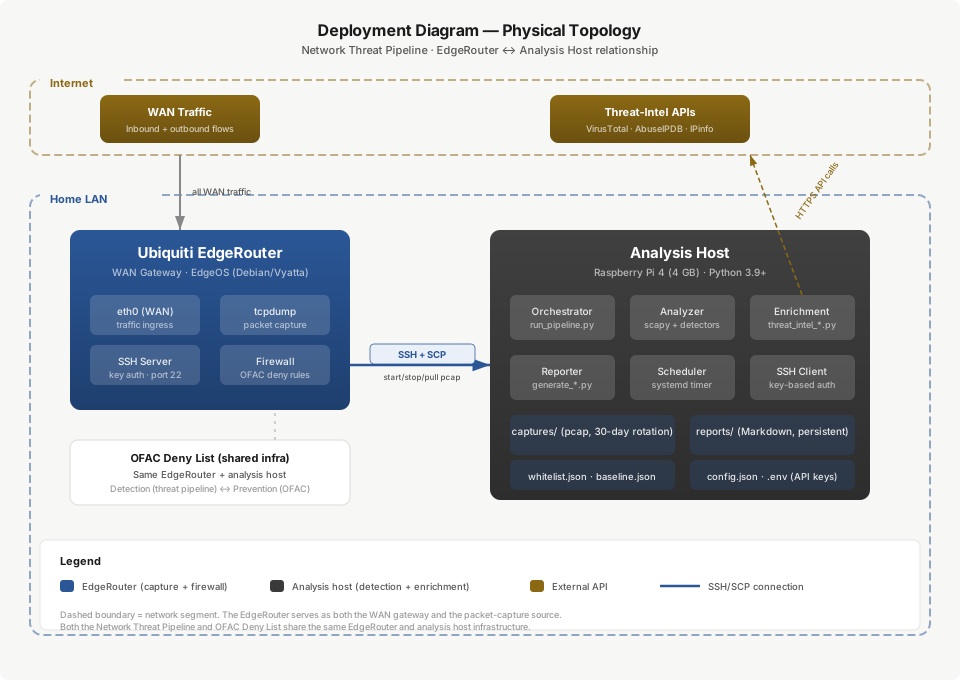
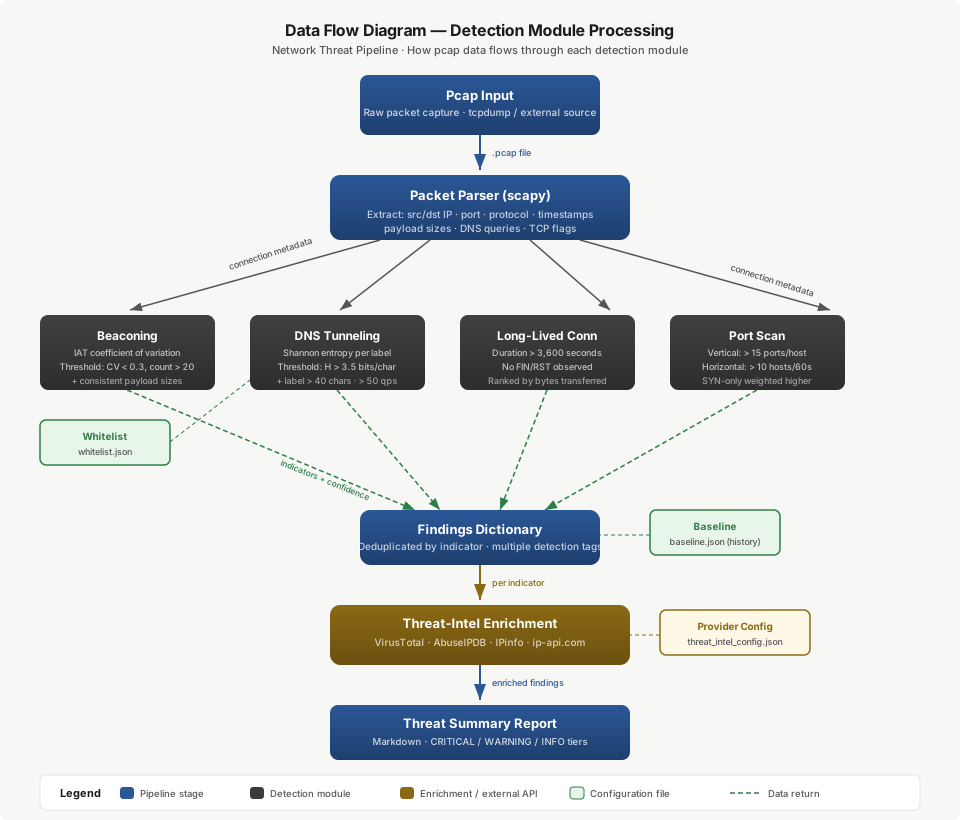
Three tiers, connected by channels that each run one way.
The router captures and enforces, and does nothing else. Scheduled tasks capture WAN traffic, ship a device-attribution map, pull the two signed block lists, and reload enforcement. Two boot hooks re-apply enforcement after every reboot.
The cloud analysis tier is a private repository whose scheduled workflows download pending captures, run detection, enrich and score flagged indicators, tag geography, update the rolling baseline, attribute findings to devices, raise alerts, rebuild the dashboard, and commit the results. A separate watchdog workflow watches the pipeline itself.
The distribution tier is a public repository whose scheduled workflows rebuild the IP deny list and the DNS blocklist from public sources, sign them, and publish them as rolling releases the router pulls without any credential.
The channels are deliberately asymmetric. Captures and device maps flow up into private storage. Signed block lists flow down into the router. Capture-derived hits — the pipeline's own verdicts — never leave private storage at all: they are written to the private analysis repository and merged into the signed lists locally, on the router, at pull time. That is what lets the enforcement artifacts be fully public without disclosing anything about this network.
Read as one system, detection and prevention are not two layers that happen to share a device. The analysis tier decides what is bad; the distribution tier signs and ships decisions the edge can verify; the router enforces both those and its own observations from the same named set.
6. Repositories & Trust Zones
| Repository | Visibility | Role |
|---|---|---|
| Pipeline source (umbrella) | Private | Source of truth: architecture docs, router-side script originals, portable analysis code, and the publication workflow originals. |
| Capture ingest | Private | Cloud analysis. Receives captures and device maps, runs the pipeline, stores reports, baseline, alerts, geography and dashboard, and publishes capture-derived block hits. |
| Deny-list generator | Private | Sanctions resolution, the router-side pull scripts, and the two boot hooks. |
| Block-list distribution | Public | Tokenless distribution of the signed IP deny list and the signed DNS blocklist. Public data only. |
The ownership boundary matters when reading the rest of this document: the analysis tier produces indicators and stops there; the deny-list side owns the entire router-side consumption path — both pull scripts, both boot hooks, and the merge step that folds capture-derived hits into the signed lists. Nothing in the public repository is derived from the network's own traffic.
7. Components
Router side — capture and enforce only
| Component | Schedule | Responsibility |
|---|---|---|
| Capture and ship | Every 6 hours | Snaplen-128 capture on the WAN VLAN for a bounded window, gzip, upload as a transient release asset to the private ingest repository, delete the local capture. |
| Conntrack ship | Every 2 hours | Read the connection table, map pre-NAT internal sources to external destinations, join DHCP leases to hostnames, ship a device-map CSV. |
| IP block-list pull | Daily | Pull the signed IP set, verify checksum, signature, and entry floor, merge capture-derived hits, reload through the boot loader. |
| DNS block-list pull | Daily | Pull the signed domain list, verify checksum, signature, and floor, merge capture-derived domain hits, signal the resolver to reload. |
| IP enforcement boot hook | On boot | Load the deny set and re-insert the drop and log rules into the WAN input, local, and output chains. |
| DNS enforcement boot hook | On boot | Recreate the resolver's additional-hosts drop-in and restart the resolver — required because the configuration directory is a non-persistent overlay. |
Cloud analysis — all detection
| Component | Responsibility |
|---|---|
| Pipeline runner | Packet parsing and the four detection modules; emits the report, flagged IPs, flagged domains, and an endpoint inventory. |
| Threat-intel enrichment | Multi-source reputation scoring on flagged indicators only, to stay inside free quotas. Keys fetched from an external vault at run time. |
| GeoIP enrichment | Local country lookups against a licensed offline database; feeds both the baseline and the dashboard. |
| Baseline engine | Rolling per-endpoint profile using Welford statistics; flags new endpoint, new port, new country, volume anomaly, and off-hours contact. |
| Attribution | Annotates every finding with the internal device that generated the flow, from the shipped device map. |
| Alert builder and notifier | Fuses high-risk verdicts and high-severity anomalies, tagged with the responsible device, into de-duplicated issues. |
| Dashboard builder | Renders a self-contained dashboard with no external dependencies, committed each run. |
| Watchdog | Detects a stalled capture feed or any failed pipeline run, opens a de-duplicated issue, and auto-closes it on recovery. |
Deny-list publication — all enforcement data
| Component | Responsibility |
|---|---|
| Deny-list generator | Fetches OFAC data, resolves countries and entity ASNs to prefixes, applies the ASN whitelist, writes combined and per-source lists with provenance metadata. |
| IP feed collector | Appends public IP threat feeds, normalizing everything to CIDR and tolerating any unreachable feed. |
| DNS feed collector | Builds the malware/C2 domain set, normalizing hosts-format and bare-domain lines, lowercasing, dropping localhost and invalid entries. |
| IP publication workflow | Daily. Runs the generator and feed collector, builds the ipset add-list, enforces the entry floor, checksums, signs, publishes the rolling release. |
| DNS publication workflow | Daily. Same shape for the domain list. |
8. Detection Methods
Four behavioural detectors run over the parsed connection and DNS records. Each is deliberately narrow and high-signal rather than general-purpose, and each emits evidence alongside its verdict so a finding can be argued with.
Beaconing. Outbound connections are grouped by destination; the inter-arrival time distribution is computed per destination; a destination is flagged when the coefficient of variation of inter-arrival times falls below 0.15 — that is, the callbacks are near-metronomic — with at least 10 connections and a mean interval under 2 hours. Regularity, not volume, is the signal: a human-driven session is bursty, a scheduled implant is not.
DNS tunneling. Per-domain, the Shannon entropy of subdomain labels is averaged and combined with label length and query volume. A domain is flagged when mean entropy exceeds 3.5 bits per character alongside long labels, when any label exceeds 50 characters, or when a domain shows more than 100 unique subdomains at entropy above 3.0. Severity escalates above entropy 4.0. Legitimate subdomains are short and low-entropy; encoded data channels are neither.
Long-lived connections. Sessions exceeding 30 minutes are surfaced and ranked by bytes transferred, on the reasoning that a persistent session moving data is materially more interesting than an idle keepalive.
Scanning. A source is flagged for a vertical scan at 25 or more distinct destination ports on one host, and for a horizontal sweep at 25 or more distinct destination hosts on the same port.
Baseline anomaly runs alongside the four detectors rather than inside them. A rolling per-endpoint profile records what is normal for this network — which endpoints, which ports, which countries, what volume, what hours — using Welford's online statistics so the profile updates without retaining history. It flags a new endpoint, a new port, a new country, a volume z-score at or above 3.0, or contact during the configured off-hours window, and ages entries out after 45 days. It needs roughly one to two weeks of warm-up before its output is worth acting on, which is stated in the report rather than hidden.
9. Deny-List Composition
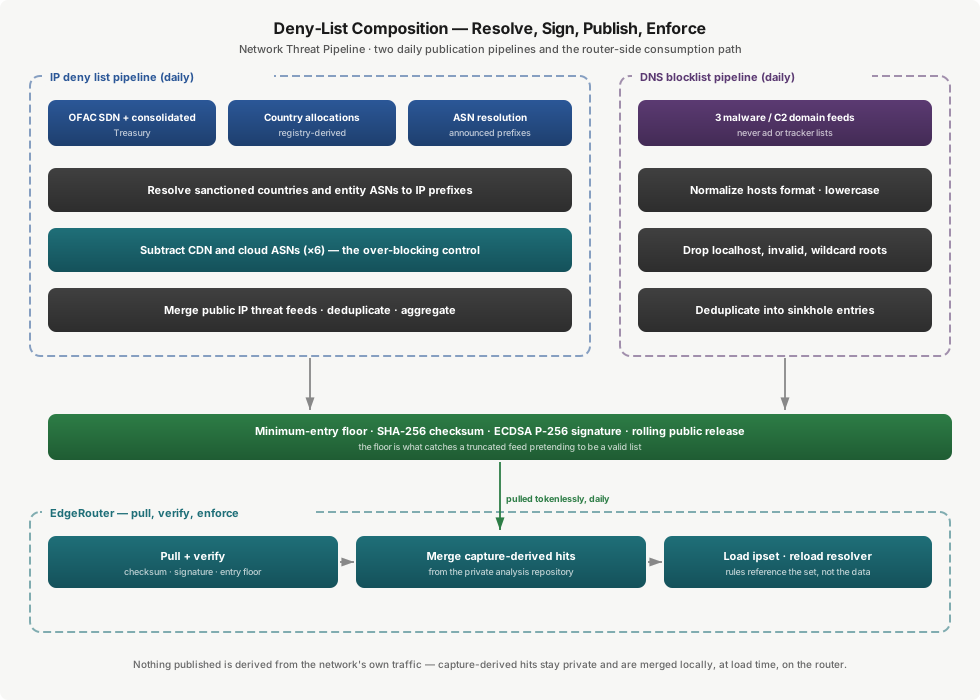
The IP deny list is assembled fresh each day in five stages.
- Sanctions fetch. The current OFAC SDN and consolidated lists are downloaded from Treasury. The parser extracts entity records and country associations, and derives entity keywords used for ASN matching. A format change causes the parser to abort by design — the failure mode is a missed update, not incorrect data.
- Country resolution. Each comprehensively sanctioned country code is resolved to its aggregated prefix list from registry-derived country allocation data. A watchlist tier exists and is disabled by default — enabling it materially increases the enforced set and is a deliberate policy decision, not a configuration default someone inherits.
- Entity and ASN resolution. Configured sanctioned-region ASNs, including annexed-region operators, are resolved to their announced prefixes, so networks operated by sanctioned entities are covered even when they fall outside a sanctioned country's allocation.
- Whitelist subtraction. Prefixes announced by the six major CDN and cloud ASNs are subtracted. This is the primary over-blocking control, and it is applied before feeds are merged.
- Threat-feed merge. Public IP threat feeds are appended, normalized to CIDR, and the whole set is deduplicated and aggregated into ipset add-lines.
The DNS blocklist is simpler and deliberately narrower: three public malware and C2 domain feeds, normalized to hosts format, lowercased, filtered against localhost, invalid and wildcard-root entries, and deduplicated into sinkhole entries. No ad or tracker lists are used at any point.
Both lists then pass the same gate — minimum-entry floor, SHA-256 checksum, ECDSA P-256 signature — and are published as rolling public releases.
10. Data Flows
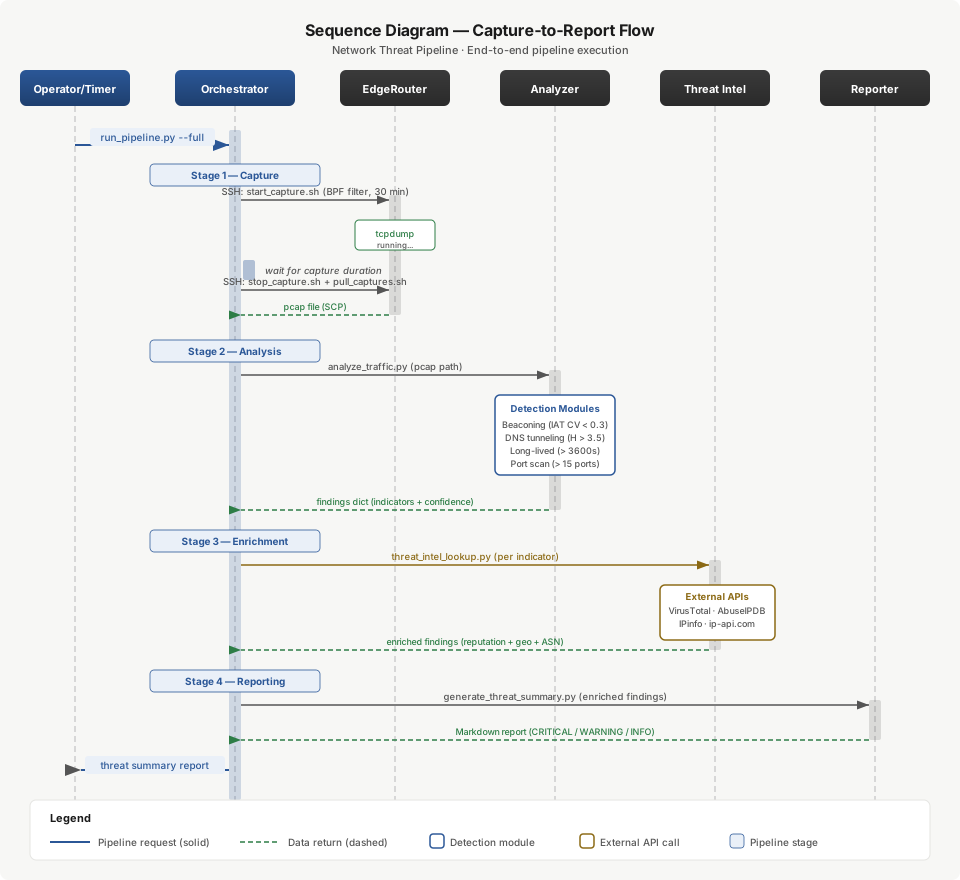
Analysis loop — every six hours. The router captures and uploads the capture, plus the most recent device map, to the private ingest release. Roughly fifteen minutes later the analysis workflow downloads pending assets, detects, enriches, GeoIP-tags, baselines, attributes, alerts, and rebuilds the dashboard, then commits reports, baseline, alerts, geography, and dashboard. Processed capture assets are deleted only after a successful commit and push, so a capture is never lost without a report to show for it.
Enforcement feedback loop. Confirmed-bad IPs — suspicious and high-risk verdicts — are appended to a capture-hits IP file; high-severity DNS-tunneling domains are appended to a capture-hits domain file. Both live in the private ingest repository. The router merges them on its next pull, so the network's own observations become its own enforcement without ever being published.
Publication — daily. The two publication workflows rebuild, gate, sign, and publish the IP and DNS lists as described in §9.
Pull and enforce — daily. The router downloads each artifact, recomputes the checksum, verifies the signature against the installed public key, and checks the entry floor. Any failure ends the run with the currently loaded set untouched. On success it merges the capture-derived hits and loads the combined set into the ipset, or writes the resolver drop-in and signals a reload. The firewall rules reference the named set, so the rules themselves never change — which means a list update cannot produce a partially-applied rule state, and reloading the previous set is the rollback.
Boot re-application. On reboot, the two hooks recreate the set, re-insert the rules, and rebuild the resolver drop-in before the overlay's amnesia can take effect.
11. Data Model
The system is file- and repository-backed rather than database-backed; the repository is the audit trail, which is deliberate.
Captures — headers-only, gzipped, held as transient release assets in the private ingest repository and deleted after a successful analysis commit. They are never committed to a tree.
Reports — one timestamped directory per run containing the raw threat report and the enriched report, committed and retained.
Baseline profile — a single JSON document holding per-endpoint running statistics: counts, Welford mean and variance for volume, first- and last-seen timestamps, observed ports and countries, and hour-of-day distribution. Age-out is a property of the writer, not a cleanup job.
Device map — a CSV of internal IP, MAC, hostname, and external destination, shipped by the router and consumed by attribution.
Capture-derived hits — two append-only files in the private analysis repository, one of prefixes and one of domains. These are the feedback channel into enforcement, and the one artifact class that is deliberately never published.
Endpoint inventory and geography — the observed external endpoint list and its resolved country mapping, feeding the baseline's new-country test and the dashboard.
Dashboard — a single self-contained HTML file with no external dependencies, rebuilt and committed each cycle so it renders from the repository with nothing else running.
Published block lists — the artifacts the router consumes: an ipset add-list and a hosts-format domain list, each accompanied by a SHA-256 checksum file and an ECDSA signature file.
Deny-list configuration — sanctioned country set, watchlist country set with an explicit enable flag, annexed-region ASNs, CDN and cloud whitelist ASNs, set name, address-family scope, and request timeout and pacing.
Provenance metadata — per-run statistics and source attribution written alongside the generated lists: which countries resolved, which entities matched, how many prefixes each source contributed, and what the whitelist removed.
12. External Interfaces
| Source | Purpose | Auth | Failure behaviour |
|---|---|---|---|
| AbuseIPDB | Abuse confidence score, report count, ISP and usage type | API key | Marked skipped; other sources still enrich |
| VirusTotal | IP reputation and detection ratio | API key | Free-tier rate limits are the binding constraint on enrichment throughput |
| GreyNoise | Internet-background-noise classification — separates opportunistic scanners from targeted activity | API key | File-backed cache, 30-day TTL on malicious classifications and 7-day on benign; quota exhaustion stops further calls for the run and marks them skipped rather than failing |
| AlienVault OTX | Community pulse membership and context | API key | Marked skipped |
| Shodan InternetDB | Open ports and exposure context | None | Marked skipped |
| MaxMind GeoLite2 Country | Country attribution | License key at build time | Local database lookups; no per-query API call |
| Treasury OFAC SDN and consolidated lists | Sanctioned entities, countries, and programs | Public | Abort the run — publishing against stale sanctions data is worse than skipping |
| Country IP allocation data (registry-derived, aggregated) | Country code to prefix resolution | Public | Skip that country, record the gap, continue |
| ASN-to-prefix resolution | Entity and annexed-region network resolution | Public | Omit entity prefixes for the run; country coverage unaffected |
| CDN and cloud provider ASNs (×6) | Whitelist subtraction | Public | Treated as a safety control — not silently ignored |
| FireHOL level 1 · Spamhaus DROP and EDROP · abuse.ch Feodo · Tor bulk exit list | Public IP threat feeds | None | Contributes nothing; run continues; the floor catches the aggregate case |
| abuse.ch URLhaus · URLhaus de-noised derivative · abuse.ch ThreatFox | Public malware/C2 domain feeds | None | Contributes nothing; run continues |
| External secrets vault | Threat-intel and GeoIP credentials, fetched at workflow run time | Machine identity | Enrichment is skipped for the run rather than failing it |
| Rolling public releases | Distribution channel to the router | None on read | Router keeps its current list |
All threat-intel calls are read-only lookups. Only IP addresses and domain names are sent; no traffic content leaves the pipeline, because headers-only capture means there is none to send.
The asymmetry in failure behaviour is deliberate: sanctions data failing aborts, because the resulting list would be wrong; a threat feed failing does not, because the list would merely be smaller — and the entry floor catches the case where "smaller" means "broken."
13. Integrity & Supply Chain
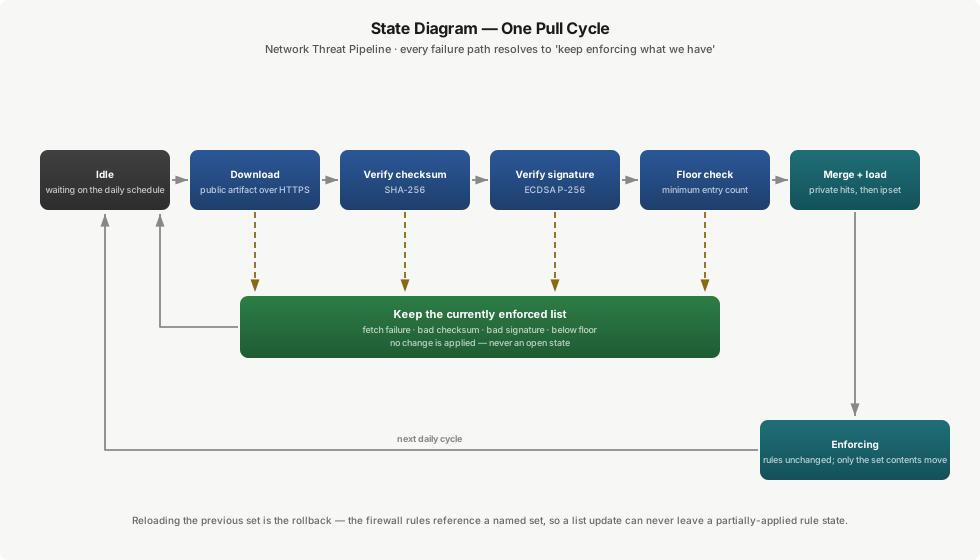
Every artifact the router loads is checksummed and ECDSA P-256 / SHA-256 signed at publication, and verified on the router before anything is loaded. The signing key exists only as a secret in the distribution repository and is regenerable; its public half is installed on the router filesystem. Rotation is: regenerate the pair, set the new private half as the repository secret, install the new public half on the router — publication and verification realign on the next cycle.
Verification is three checks, in order: checksum, signature, entry floor. Any failure ends the cycle with the previously loaded list still enforced. The same floor is enforced at publication, so a truncated build never becomes a published artifact in the first place.
Unsigned publication is visible, not silent. If the signing key is absent the workflow emits a warning and publishes unsigned — and the router, which requires a valid signature, declines to load it. The failure surfaces at the point of enforcement rather than being papered over.
14. Error Handling & Resilience
Fail-safe enforcement. No internet, a corrupt download, a bad signature, a truncated list, or a platform outage all resolve to keep enforcing what we have — never to an open state.
Feed tolerance. Every public feed fetch is bounded by connect and total timeouts and tolerates failure; an unreachable feed yields nothing and the remaining feeds still produce a list.
Enrichment degradation. Each provider call is independently guarded. A provider that errors, times out, or exhausts quota is marked skipped in the finding's metadata and the remaining providers still enrich it. A finding enriched by three sources of five is more useful than a pipeline that fails because one API is down.
Quota-aware caching. GreyNoise results are cached to disk with class-dependent TTLs, and an HTTP 429 stops further calls for the run rather than burning the remaining daily quota on retries.
Capture safety. Processed capture assets are deleted only after the analysis results are committed and pushed. A failure anywhere earlier leaves the capture in place for the next run.
Rules decoupled from data. The firewall rules reference the named set; only the set contents change. There is no rollback procedure to get wrong — reloading the previous set is the rollback.
Pipeline self-observation. The watchdog treats the pipeline's own silence as a fault: a stale capture feed or a failed workflow opens a de-duplicated issue, which auto-closes on recovery. A monitoring system that cannot detect its own failure is a monitoring system that will eventually be quietly dead.
Boot resilience. Enforcement is re-applied by boot hooks because the platform regenerates firewall chains on commit and wipes the resolver's configuration overlay on reboot.
Concurrency. Every scheduled workflow is concurrency-grouped without cancellation, so a long run cannot overlap itself or be killed mid-publication.
15. False Positives & Over-Blocking
Detection heuristics produce false positives and geolocated block lists over-block. The system addresses both explicitly rather than pretending otherwise.
Own-infrastructure exclusion. The home and WAN address is detected per run from the traffic itself, and known own-infrastructure endpoints are excluded before enrichment — which also avoids spending API quota on known-good traffic.
Layered evidence rather than a binary verdict. A finding carries its detection evidence, its threat-intel verdict, and its baseline context. An endpoint with metronomic timing but a clean reputation and a long-established baseline entry is a scheduled update check; the same timing to a new endpoint in a new country with an abuse history is not. Enforcement is driven only by the strong end of that spectrum.
Background-noise separation. GreyNoise exists in the source set specifically to distinguish internet-wide opportunistic scanning from activity aimed at this network, which is the single largest source of noise in edge telemetry.
ASN-based CDN whitelist. The primary control against blocking legitimate services that geolocate into sanctioned regions, and one that follows provider infrastructure changes rather than decaying like a static allow list.
Scope discipline. The watchlist country tier is off by default, and DNS sinkholing covers malware and C2 only — so a bad entry degrades a malware callback rather than someone's browsing.
Warm-up honesty. The baseline is explicitly not trustworthy until it has one to two weeks of history, and threshold tuning against observed false-positive rates is a named backlog item rather than an assumed success.
16. Non-Functional Requirements
| NFR | Target | Basis |
|---|---|---|
| Operator involvement | Zero for a normal cycle | Fully scheduled: capture, ship, analyze, publish, pull, enforce, alert |
| Analysis cadence | Every 6 hours, offset ~15 minutes after capture shipping | Scheduled workflow |
| Device attribution freshness | Connection-table map shipped every 2 hours | Scheduled router task |
| Enforcement freshness | ≤ 24 hours from source update | Daily publication; daily router pull |
| Credentials on the router | Zero | Tokenless public pull; verification by installed public key |
| Integrity | Checksum + ECDSA P-256/SHA-256 signature verified before load | Verified with the toolchain the router already has |
| Minimum list size | Publication and load both refused below the floor | Guards against silent truncation |
| Router boot time with full enforcement | ~1 minute | Measured; ~22 minutes using a firewall network-group for the same prefix count |
| Enforcement failure mode | Keep current list | Verification failures never open the edge |
| Capture retention | Deleted after each successful analysis commit | Ephemeral by design, both ends |
| Payload retention | None | Snaplen-128 headers-only capture |
| Public disclosure | Public artifacts contain no locally-derived data | Capture hits live only in the private repository |
| Baseline warm-up | 1–2 weeks before anomaly output is actionable | Rolling per-endpoint statistics with 45-day age-out |
| Cost | Zero marginal | Free CI minutes, free-tier threat intel, public feeds, existing hardware |
17. Security & Trust Model
Secrets. Threat-intel and GeoIP credentials live in an external secrets vault and are fetched at workflow run time under a machine identity — never committed, never held as long-lived CI secrets, and masked in logs. The router holds no threat-intel credential at all, and the publication runners hold nothing but the signing key.
No inbound path. There is no credentialed push into the router and no key authorized for it. The router initiates everything.
Supply-chain integrity. Covered in §13: origin authenticity, not just transfer integrity, is what permits a publicly-fetched artifact to be loaded into the firewall.
Public/private separation. Only derived public block data lives in the public repository. Captures, reports, device maps, and capture-derived hits stay private, and the router merges the private half locally at load time.
Capture privacy. Headers-only capture means payload is never recorded, never shipped, and never stored. Captures are deleted after each cycle.
Auditability. Everything the pipeline produces is committed, and both published lists carry checksums, signatures and run history. What was detected — and what was enforced — on a given day is reconstructible.
18. Tech Stack
| Layer | Technology | Role |
|---|---|---|
| Capture | tcpdump on EdgeOS, snaplen 128 | Headers-only WAN capture on a schedule |
| Router automation | EdgeOS task-scheduler, post-configuration hooks | Capture, ship, pull, and re-apply enforcement across reboots |
| Router enforcement | ipset + iptables; dnsmasq additional-hosts | IP-layer drops and DNS-layer sinkholing |
| Attribution source | conntrack + DHCP leases | Pre-NAT internal source to external destination, resolved to hostnames |
| Transport | GitHub Releases | Authenticated transient capture upload; tokenless signed block-list distribution |
| Orchestration | GitHub Actions (scheduled + manual dispatch) | All analysis and all publication |
| Parsing and analysis | Python — dpkt, pandas, numpy | Packet parsing, detection, statistics |
| Deny-list resolution | Python 3 (standard library) | Sanctions parsing, country and ASN resolution, whitelist subtraction, provenance |
| Feed collection | Bash + curl | Public IP and domain feed fetch, normalization, deduplication |
| Geolocation | MaxMind GeoLite2 Country via geoip2 | Offline country attribution |
| Enrichment | Python + HTTP against five sources | Reputation scoring with quota-aware caching |
| Secrets | External secrets vault with machine-identity auth | Run-time credential fetch |
| Integrity | OpenSSL ECDSA P-256 / SHA-256, SHA-256 checksums | Signed lists verifiable by the router's toolchain |
| Presentation | Self-contained HTML dashboard, no external assets | Renders from the repository with nothing running |
| Alerting | De-duplicated GitHub Issues | Findings and pipeline-health alerts, auto-closing on recovery |
19. Deployment & Operations
Router. Scheduled tasks, the two pull scripts and the two boot hooks are installed on the EdgeRouter, along with the block-list signing public key. Capture runs every six hours, device mapping every two, and both pulls daily. Enforcement is re-applied automatically after any reboot.
Cloud. Analysis runs every six hours; both publication workflows run daily. All have manual dispatch available and are concurrency-grouped. Everything the pipeline produces — reports, baseline, alerts, geography, dashboard — is committed, so the repository history is the operational record.
Routine operations. There are none in a normal week. The intended interaction is reading the dashboard and triaging any issue the alert builder or watchdog opened.
Change control. Scope changes — enabling the watchlist tier, adding entity ASNs, adjusting the whitelist, retuning detector thresholds — are configuration commits that take effect on the next scheduled run.
Recovery. A lost baseline re-warms over one to two weeks. A failed publication leaves yesterday's release in place. A failed pull leaves the loaded set in place. A failed analysis run leaves its captures in place for the next run. A router reset requires re-installing the scheduled tasks, scripts, hooks and public key; enforcement then rebuilds itself from the next pull.
20. Cross-Project Context
PAN-OS Universal Refactor. Different scale, same instinct: that project treats an enterprise firewall configuration as data to be analyzed, transformed, and verified rather than edited by hand. Both refuse to deploy a change that fails validation, and both keep the previous state recoverable — here by making the enforced data a named set the rules merely reference.
21. Risks, Assumptions & Limitations
- Heuristic detection. Thresholds are tuned by hand and need revisiting against observed false-positive rates once the baseline is warm. This is a named backlog item, not a solved problem.
- No payload inspection. Headers-only capture is a deliberate privacy trade that forecloses signature-based detection. The Suricata option on the roadmap addresses it over the same captures.
- Sampled visibility. Capture windows are bounded and periodic, not continuous. Activity entirely between windows is not seen, and capture fidelity depends on WAN placement and the filter.
- Batch, not real time. Worst-case detection latency is one capture cycle plus one analysis cycle, and enforcement of a new verdict waits for the next daily pull. This is monitoring, not prevention-at-line-rate.
- Free-tier dependency. Enrichment throughput is bounded by free-tier quotas, and quality depends on the configured providers. Caching and skip behaviour degrade gracefully but do not remove the ceiling.
- IP-to-geography mapping is approximate. Registry allocations and BGP announcements do not map cleanly onto physical geography. The ASN whitelist removes the highest-impact false positives; smaller hosting providers with presence in sanctioned regions remain an edge case.
- Country-level blocking is blunt by construction. Blocking a country's allocation blocks everything in it. That is a policy choice appropriate to a home edge and would need refinement in a context with legitimate traffic to those regions.
- Feed trust is inherited. The public threat feeds are well-regarded but not infallible; a false positive in a feed becomes a block here. The entry floor catches truncation, not incorrectness.
- Baseline warm-up. Anomaly output is not meaningful for the first one to two weeks after a reset.
- IPv4 only in enforcement. The generator supports IPv6 and it is disabled, so IPv6 paths to sanctioned or hostile networks are not currently blocked.
- Router capacity. The enforced set must stay within the device's practical ipset and forwarding-plane capacity. Aggregation and the disabled watchlist tier keep current runs comfortably inside it; enabling the watchlist would need capacity re-measured.
- Domain-level DNS blocking. A malicious host on a shared domain cannot be sinkholed without collateral damage; the IP layer covers that case instead.
- Single-router scope. Enforcement and capture assume one edge device. Multiple sites would need per-router configuration and per-site baselines, though the publish-and-pull model already generalizes to N routers without change to the publication side.
22. Roadmap
Phase 5 — signature detection. Run Suricata with the Emerging Threats ruleset over the captures already being shipped, adding a signature layer alongside the behavioural and baseline layers without changing the capture path.
Per-device baselines. Scope anomaly baselines per device using the attribution data already collected, so a normal endpoint contacted by an unusual device still stands out — the highest-value improvement to signal quality now that attribution exists.
Threshold tuning. Tune the baseline configuration against measured false-positive rates once warm-up is complete, and re-tune the four detector thresholds against the same evidence.
Enforcement review queue. Introduce an explicit review step between a high-risk verdict and automatic blocking for classes of finding where over-blocking is expensive, keeping automatic enforcement for unambiguous ones.
IPv6 enforcement. The generator already supports IPv6 allocation data; the work is the enforcement path — a parallel set, parallel rules, and re-measured capacity.
Per-source attribution at the edge. Split the enforced set by origin — sanctions, feed, locally-observed — so a log entry says why something was blocked without a lookup back into the publication history.