
Solution Architecture Document — ServiceBay AI MCP Server
Project: MCP Server (ServiceBay AI <-> Claude Desktop) Author: Jarrod E. Brown Status: Working Repository: Private
1. Overview
The ServiceBay AI MCP Server is a Python-based bridge that connects Claude Desktop to IBM watsonx Orchestrate via the Model Context Protocol (MCP). It exposes four tools — two that proxy Orchestrate agent interactions and two that call public APIs directly — allowing Claude to access ServiceBay AI's multi-agent diagnostic capabilities and supplementary vehicle data without leaving the desktop AI workflow.
The server implements the Protocol Bridge pattern: it translates between two AI ecosystems (Anthropic's MCP and IBM's Orchestrate API) while managing the authentication, session lifecycle, and error boundaries that neither system handles natively for the other. The result is a thin integration layer that makes Orchestrate agents appear as native Claude tools.
2. Problem & Context
The ServiceBay AI agents run inside IBM watsonx Orchestrate, accessible through Orchestrate's chat interface or its REST API. Calling these agents from another AI surface — Claude Desktop — requires managing IBM IAM authentication (API key to bearer token exchange), constructing Orchestrate-specific API payloads, handling session state, and dealing with region-specific endpoint configuration. Without an integration layer, a developer would repeat this plumbing for every interaction, and a non-developer user couldn't access the agents from Claude at all.
The Model Context Protocol provides a standardized way for AI clients to discover and call external tools, but IBM watsonx Orchestrate has no native MCP support. This gap means Orchestrate agents are invisible to MCP-compatible clients unless a bridge exists. The MCP server fills that gap: it registers Orchestrate capabilities as MCP tools, handles the authentication dance, and maps MCP tool calls to Orchestrate API requests.
A secondary motivation is resilience. Two of ServiceBay AI's core capabilities — NHTSA recall lookup and repair shop discovery — don't inherently require Orchestrate. By implementing these as direct-API tools alongside the Orchestrate proxy tools, the MCP server ensures that recall checks and shop searches remain available even when Orchestrate is unreachable, providing a partial-but-useful fallback for the most safety-relevant features.
3. Goals & Requirements
Functional
- Expose four tools to any MCP-compatible client:
list_agents— enumerate all agents in the configured Orchestrate instance.chat_with_agent— send a natural-language message to a named Orchestrate agent and return its response.check_recalls— look up NHTSA recalls for a vehicle by year, make, and model (direct API, no Orchestrate dependency).find_repair_shops— find nearby auto repair shops by ZIP code using OpenStreetMap (direct API, no Orchestrate dependency).- Manage IBM IAM authentication transparently — the calling client never sees API keys or bearer tokens.
- Support standard MCP transport (stdio) so the server works with Claude Desktop and any future MCP-compatible client.
Non-functional
- Authentication overhead should not meaningfully degrade response latency beyond the upstream API call time. IAM tokens should be cached for their validity period rather than re-fetched on every request.
- The two direct-API tools must remain functional when Orchestrate is unavailable, providing partial resilience.
- Secrets must never leave the local
.envfile — no credentials in logs, error messages, or committed files. - Single-file server architecture (
server.py) to minimize operational complexity for a single-builder project.
4. Decision Rationale
Why MCP over a custom integration? The Model Context Protocol is an open standard supported natively by Claude Desktop and an expanding set of AI clients. Building an MCP server rather than a Claude-specific plugin or a REST API wrapper means the integration works with any MCP client without modification. The protocol handles tool discovery, schema advertisement, and invocation semantics, so the server only needs to implement the actual tool logic. The alternative — a bespoke Claude plugin or a standalone REST API — would have required building or configuring a client-side integration layer in addition to the server.
Why Python over TypeScript? The MCP SDK is available in both Python and TypeScript. Python was chosen because the IBM watsonx client libraries and IAM authentication SDKs are Python-native, and the ServiceBay AI ecosystem (test harnesses, data pipelines, and Orchestrate export tooling) is Python-based. Using TypeScript would have required either porting IBM SDK usage or managing a mixed-language dependency chain. For a single-file server that primarily makes HTTP calls, Python's requests library and python-dotenv keep the dependency footprint minimal.
Why stdio transport over HTTP/SSE? MCP supports multiple transports. The stdio transport (the server reads from stdin and writes to stdout) was chosen because Claude Desktop's MCP configuration natively supports stdio-based servers with zero networking setup. An HTTP/SSE transport would have required configuring a local port, handling CORS for browser-based clients, and managing a persistent server process independently of Claude Desktop. Since the primary (and currently only) client is Claude Desktop running on the same machine, stdio is the simplest correct choice. If remote clients are needed later, the MCP SDK supports adding an HTTP transport without changing the tool implementations.
Why a single-file server? The four tools and the IAM authentication logic total approximately 250 lines of Python. Splitting this into multiple modules (auth, orchestrate_client, direct_tools, server) would add import management and project structure overhead without improving readability or testability at this scale. The single-file approach keeps the deployment surface minimal: one file to run, one .env to configure, one requirements.txt to install. If the server grows beyond 500 lines or adds stateful features (token refresh background tasks, connection pooling), a module split becomes warranted.
Why include direct-API tools alongside Orchestrate proxy tools? The NHTSA recall lookup and OpenStreetMap shop search don't need Orchestrate — the data comes from public APIs that the server can call directly. Including these as direct tools serves two purposes: resilience (these safety-relevant features remain available when Orchestrate is down) and latency (skipping the Orchestrate agent hop for simple API lookups saves 2-4 seconds per call). The tradeoff is that these tools duplicate functionality that exists inside ServiceBay AI's recall and repair agents, but the duplication is justified by the availability and performance benefits.
5. Architecture Overview
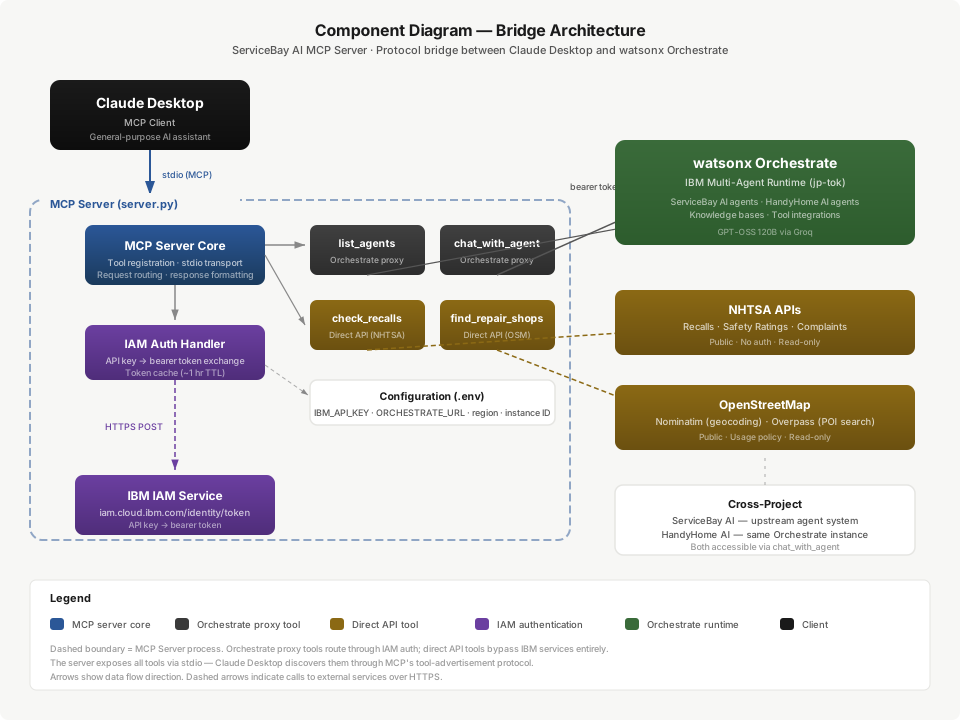
The server sits between Claude Desktop (MCP client) and three upstream services: IBM IAM (authentication), IBM watsonx Orchestrate (agent interactions), and public APIs (NHTSA, OpenStreetMap). Claude Desktop launches the server as a subprocess communicating over stdio. When Claude invokes a tool, the server routes the request to the appropriate upstream, handles authentication if needed, and returns the result through the MCP protocol.
The architecture has two distinct paths:
Orchestrate path (list_agents, chat_with_agent): The server first obtains an IAM bearer token by exchanging the IBM Cloud API key with the IAM token service. It then uses this token to authenticate against the Orchestrate REST API, either listing available agents or sending a chat message to a specific agent. The agent's response flows back through the MCP protocol to Claude.
Direct path (check_recalls, find_repair_shops): The server calls public APIs directly — NHTSA for recall data, Nominatim + Overpass for shop discovery — without any IBM authentication. These tools bypass Orchestrate entirely, providing lower latency and independence from IBM service availability.
6. Components
| # | Component | File / Module | Responsibility |
|---|---|---|---|
| 1 | MCP Server Core | server.py (main) |
Registers the four tools with the MCP SDK, handles stdio transport, and routes incoming tool calls to the appropriate handler. |
| 2 | IAM Auth Handler | server.py (auth section) |
Exchanges the IBM Cloud API key for an IAM bearer token via https://iam.cloud.ibm.com/identity/token. Caches the token for its validity period (~1 hour). |
| 3 | Orchestrate Client | server.py (orchestrate section) |
Calls the watsonx Orchestrate REST API to list agents and send chat messages. Constructs region-specific endpoint URLs and attaches the IAM bearer token. |
| 4 | NHTSA Recall Tool | server.py (direct tools) |
Queries the NHTSA Recalls API by year/make/model and returns structured recall records. No authentication required. |
| 5 | Repair Shop Tool | server.py (direct tools) |
Geocodes a ZIP code via Nominatim, then queries OSM Overpass for shop=car_repair POIs within a configurable radius. No authentication required. |
| 6 | Configuration | .env + python-dotenv |
Loads IBM_API_KEY, ORCHESTRATE_URL, instance ID, and region from a local .env file. An .env.example documents the expected shape without exposing values. |
7. Authentication Flow
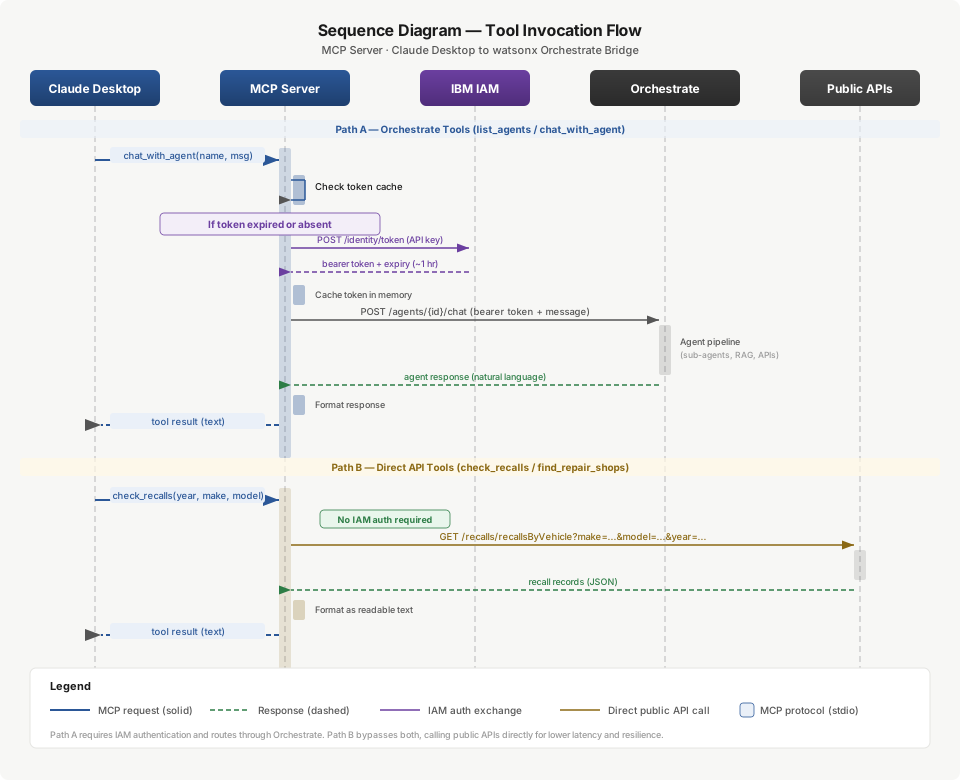
The server implements IBM's recommended two-step IAM authentication pattern:
Step 1 — Token acquisition. When the server needs to call Orchestrate and has no valid cached token, it sends a POST request to https://iam.cloud.ibm.com/identity/token with the IBM Cloud API key (grant type urn:ibm:params:oauth:grant-type:apikey). IBM returns a bearer token with an expiration time (typically 1 hour).
Step 2 — Authenticated API call. The server attaches the bearer token as an Authorization: Bearer <token> header on all Orchestrate API requests. The Orchestrate endpoint is region-specific (e.g., https://api.jp-tok.ae.ibm.com/orchestrate/... for the jp-tok region).
Token caching. The server caches the IAM token in memory and reuses it for subsequent requests until it expires. This avoids the overhead of a token exchange on every tool call (~300-500ms per IAM request). When a cached token is within 60 seconds of expiry, the next request triggers a refresh.
Failure modes. If the IAM token exchange fails (invalid API key, IAM service unavailable, network error), the Orchestrate-dependent tools (list_agents, chat_with_agent) return an error to Claude explaining that authentication failed. The direct-API tools (check_recalls, find_repair_shops) are unaffected since they don't use IBM authentication.
Concurrency note. The MCP stdio transport processes requests sequentially (one tool call at a time from the connected client), so there is no concurrent token refresh race condition in the current architecture. If the server later supports multiple simultaneous clients via HTTP transport, the token cache would need synchronization.
8. Data Flow
Orchestrate tool call flow (chat_with_agent):
- Claude Desktop invokes
chat_with_agentwith an agent name and a user message via the MCP protocol (stdio). - The MCP server checks its cached IAM token. If expired or absent, it exchanges the IBM API key for a fresh bearer token via the IAM service.
- The server constructs an Orchestrate API request with the agent name, user message, and bearer token. It sends this to the region-specific Orchestrate endpoint.
- Orchestrate routes the message to the named agent, which may in turn call its own tools and knowledge bases (see ServiceBay AI SAD for the full agent pipeline).
- The agent's response flows back through the Orchestrate API to the MCP server.
- The server extracts the response text and returns it to Claude Desktop as the tool result.
Direct tool call flow (check_recalls):
- Claude Desktop invokes
check_recallswith year, make, and model parameters. - The MCP server calls the NHTSA Recalls API directly (no authentication needed).
- NHTSA returns matching recall records as JSON.
- The server formats the results and returns them to Claude Desktop as the tool result.
Direct tool call flow (find_repair_shops):
- Claude Desktop invokes
find_repair_shopswith a ZIP code. - The MCP server geocodes the ZIP via Nominatim to get latitude/longitude.
- The server queries OSM Overpass for
shop=car_repairPOIs near those coordinates. - Results are formatted (name, address, distance) and returned to Claude Desktop.
9. Data Model
The MCP server operates on transient request-response data — it persists no state between tool calls beyond the cached IAM token.
Inbound (from Claude Desktop via MCP):
- Tool name (string): one of list_agents, chat_with_agent, check_recalls, find_repair_shops.
- Tool arguments (JSON): agent name + message for chat; year/make/model for recalls; ZIP for shops.
Outbound to Orchestrate: - IAM token request: API key (form-encoded POST). - Agent list request: GET with bearer token to the agents endpoint. - Chat request: POST with bearer token, agent identifier, and user message body.
Outbound to public APIs:
- NHTSA: GET request with year/make/model as URL path segments.
- Nominatim: GET request with ZIP code as query parameter, JSON format.
- Overpass: POST with an Overpass QL query filtering for shop=car_repair within a radius of the geocoded coordinates.
Response payloads: All results are returned to Claude as plain text or structured text (not raw JSON), formatted for readability in a conversational context. Orchestrate agent responses are passed through as-is (they are already natural-language text). NHTSA and OSM results are transformed from JSON into a human-readable summary.
Cached state: - IAM bearer token (string) + expiration timestamp. Held in a module-level variable. Cleared on server restart.
10. External Interfaces
| Interface | Endpoint | Direction | Protocol | Auth | Rate Limits | Timeout |
|---|---|---|---|---|---|---|
| MCP (Claude Desktop) | stdio (stdin/stdout) | Bidirectional | MCP over stdio | None (local process) | N/A (single client) | Client-controlled |
| IBM IAM Token Service | https://iam.cloud.ibm.com/identity/token |
Outbound | HTTPS POST | API key (form body) | IBM Cloud tier limits | 10s |
| watsonx Orchestrate — List Agents | https://api.{region}.ae.ibm.com/orchestrate/.../agents |
Outbound | HTTPS GET | Bearer token | Instance tier limits | 15s |
| watsonx Orchestrate — Chat | https://api.{region}.ae.ibm.com/orchestrate/.../agents/{id}/chat |
Outbound | HTTPS POST | Bearer token | Instance tier limits | 60s (agent processing) |
| NHTSA Recalls API | https://api.nhtsa.gov/recalls/recallsByVehicle |
Outbound | HTTPS GET | None (public) | Unspecified / best-effort | 10s |
| Nominatim Geocoder | https://nominatim.openstreetmap.org/search |
Outbound | HTTPS GET | None (usage policy) | 1 req/sec (OSM policy) | 10s |
| OSM Overpass | https://overpass-api.de/api/interpreter |
Outbound | HTTPS POST | None (public) | Fair-use policy | 15s |
11. Error Handling & Resilience
IAM token refresh failure. If the IAM service is unreachable or returns an error (invalid key, rate limit, service outage), the server catches the exception and returns a descriptive error to Claude via the MCP tool result. The error message identifies the failure as an authentication issue and suggests verifying the API key and IBM Cloud service status. The direct-API tools remain fully functional — they do not depend on IAM.
IAM token expiry mid-session. IAM tokens are valid for approximately 1 hour. The server tracks the token's expiration timestamp and proactively refreshes it when the token is within 60 seconds of expiry. If a request arrives with an expired token and the refresh fails, the server returns an authentication error for that specific tool call rather than crashing the entire MCP session.
Orchestrate API errors. If the Orchestrate API returns an HTTP error (4xx or 5xx), the server maps the status code to a human-readable explanation: 401/403 → authentication issue (token may be invalid or expired, triggering a refresh attempt); 404 → agent not found (the named agent doesn't exist in the instance); 429 → rate limited; 500/503 → Orchestrate service issue. The error is returned as the tool result, not thrown as an exception, so the MCP session stays alive.
Orchestrate timeout. Agent chat interactions can take 10-60 seconds depending on agent complexity (a full ServiceBay AI diagnostic query triggers multiple sub-agent calls and RAG retrievals). The server sets a generous timeout (60 seconds for chat, 15 seconds for list) and returns a timeout error if exceeded, noting that the upstream agent may still be processing.
NHTSA API unavailability. If the NHTSA API returns an error or times out, the server returns a clear message indicating that recall data is temporarily unavailable and recommends checking NHTSA.gov directly. This matches the graceful degradation pattern established in the ServiceBay AI system.
Nominatim/Overpass unavailability. If geocoding fails, the shop search cannot proceed — the server returns an error explaining that location lookup failed. If geocoding succeeds but Overpass is unavailable, the server returns the geocoded location with a note that shop discovery is temporarily unavailable.
MCP transport errors. If the stdio transport encounters a read/write error (Claude Desktop closes the connection, pipe broken), the server exits cleanly. Since the server is launched as a subprocess by Claude Desktop, a clean exit allows Claude to report the tool as unavailable and restart the server on the next tool invocation.
Graceful degradation summary. The server is designed so that a failure in any single upstream service degrades only the tools that depend on it: - IAM down → Orchestrate tools fail; direct tools work. - Orchestrate down → Agent tools fail; direct tools work. - NHTSA down → Recall tool fails; all other tools work. - OSM down → Shop tool fails; all other tools work.
12. Non-Functional Requirements (Measured)
| NFR | Target | Basis |
|---|---|---|
| Tool registration latency | < 2s on server startup | MCP SDK initialization + tool schema registration |
| IAM token acquisition | < 1s (cached), < 2s (fresh exchange) | IBM IAM service response time; token cached for ~1 hour |
| Orchestrate agent list | < 3s end-to-end | IAM (cached) + Orchestrate GET; no agent processing |
| Orchestrate agent chat | < 60s end-to-end | Agent processing time dominates; timeout set at 60s |
| Direct tool response (NHTSA) | < 2s end-to-end | Public API call, no auth overhead |
| Direct tool response (OSM) | < 3s end-to-end | Geocode + Overpass query, sequential |
| MCP bridge overhead | < 200ms | Time added by the MCP server itself (parsing, routing, formatting), excluding upstream API time |
| Concurrent session support | 1 (stdio transport) | Single-client by design; HTTP transport would support multiple |
| Availability (direct tools) | Independent of IBM services | NHTSA and OSM tools have no IBM dependency |
13. Tech Stack
| Layer | Technology | Version | Role |
|---|---|---|---|
| Runtime | Python | 3.10+ | Server runtime; chosen for IBM SDK compatibility |
| MCP framework | MCP SDK (Python) | 1.x | Tool registration, stdio transport, protocol handling |
| Configuration | python-dotenv | latest | Loads secrets from .env without hardcoding |
| HTTP client | requests | 2.x | All outbound HTTP calls (IAM, Orchestrate, NHTSA, OSM) |
| IBM authentication | IBM IAM token API | v1 | API key → bearer token exchange |
| Agent platform | IBM watsonx Orchestrate | current | Multi-agent runtime accessed via REST API |
| Region | jp-tok | — | Orchestrate instance region (Tokyo) |
| Transport | stdio | — | MCP communication channel (stdin/stdout with Claude Desktop) |
14. Security & Compliance
Credential isolation. The IBM Cloud API key is the only secret. It lives exclusively in a local .env file that is .gitignore'd. An .env.example documents the expected variables without exposing values. The API key is read into memory once at server startup and used only for IAM token exchange — it never appears in API request headers, log output, or error messages returned to Claude.
Bearer token scope. The IAM bearer token is scoped to the IBM Cloud account and the Orchestrate service. It cannot access other IBM Cloud services beyond what the originating API key permits. The token is held in memory only and is not written to disk or logs.
No secrets in transit to Claude. The MCP protocol carries tool results (agent responses, recall data, shop listings) but never authentication credentials. Claude Desktop sees the tools as stateless functions — it has no visibility into the IAM token lifecycle.
Public API safety. The two direct-API tools make read-only GET/POST requests to public government (NHTSA) and open-data (OSM) endpoints. No authentication credentials are sent to these services. No user PII is included in the requests — only vehicle descriptors (year/make/model) and ZIP codes.
Transport security. The MCP stdio transport runs as a local subprocess — data flows through OS pipes, not a network socket. There is no network attack surface for the MCP communication channel itself. All outbound HTTP calls to IBM services use HTTPS (TLS 1.2+).
Dependency surface. The server has four Python dependencies (MCP SDK, python-dotenv, requests, and their transitive dependencies). The minimal dependency footprint reduces supply-chain risk. No native extensions or compiled modules are required.
15. Deployment & Operations
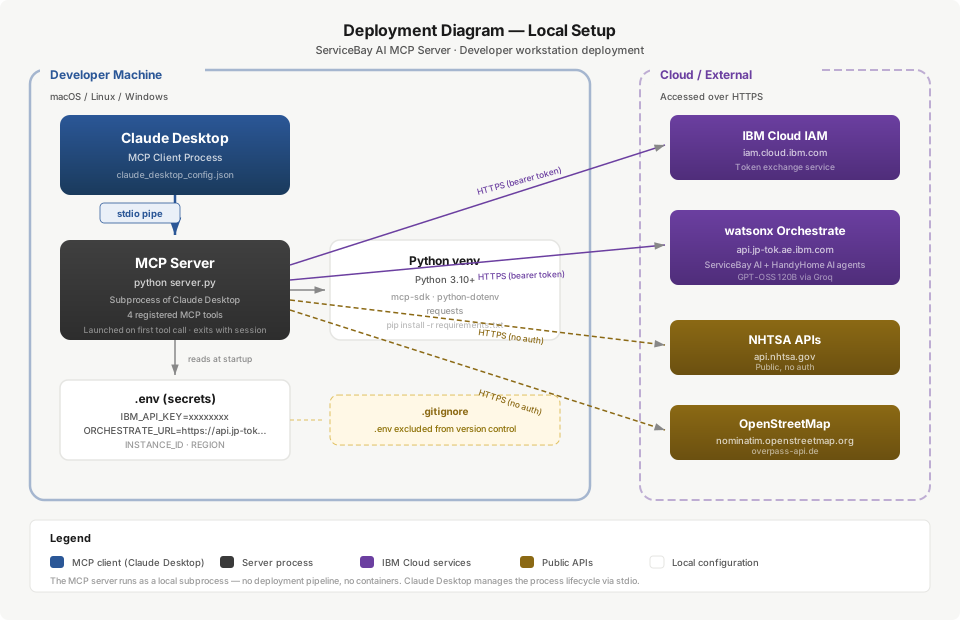
Prerequisites: Python 3.10+, pip, and a valid IBM Cloud API key with Orchestrate access.
Installation:
1. Clone the private repository.
2. Create a virtual environment: python -m venv venv && source venv/bin/activate
3. Install dependencies: pip install -r requirements.txt
4. Copy .env.example to .env and fill in: IBM_API_KEY, ORCHESTRATE_URL, instance ID, and region.
Claude Desktop configuration: Add the server to Claude Desktop's MCP configuration (claude_desktop_config.json):
{
  "mcpServers": {
    "servicebay": {
      "command": "python",
      "args": ["/path/to/MCP-Server/server.py"],
      "env": {}
    }
  }
}
Startup: Claude Desktop launches the server as a subprocess when it first needs one of the registered tools. The server runs for the duration of the Claude Desktop session and exits when the session ends.
Development mode: Run mcp dev server.py to launch the MCP Inspector, which provides a web-based UI for testing tool calls without Claude Desktop.
Monitoring: The server logs to stderr (stdout is reserved for MCP protocol messages). Log output includes tool invocation events, IAM token refresh events, and upstream API errors. Since the server runs as a local subprocess, logs are visible in Claude Desktop's developer console or by capturing stderr.
Updates: Pull the latest from the repository and restart Claude Desktop. No build step, no deployment pipeline — the server is a single Python file with pip-installed dependencies.
16. Cross-Project Context
ServiceBay AI (upstream system). The MCP server exists to make ServiceBay AI's Orchestrate agents accessible from Claude Desktop. The chat_with_agent tool is the primary integration point — it sends a user message to a named Orchestrate agent and returns the agent's response. When the message reaches the ServiceBay AI Orchestrator agent, it triggers the full multi-agent pipeline: intent parsing, severity classification, fan-out to specialist agents (knowledge, recall, cost, repair locator), and response synthesis. The MCP server doesn't need to know about this internal pipeline — it treats the Orchestrate agent as a black box that accepts a message and returns a response. See the ServiceBay AI SAD for the full agent architecture.
Agent-agnostic tooling. The MCP server's list_agents and chat_with_agent tools work with any agents on the configured Orchestrate instance without modification — the tools are agent-agnostic by design. A user can list all agents on the instance and chat with any of them through the same MCP server, so additional agent suites built on the same orchestrator-plus-specialists pattern are accessible without changes to the bridge.
Direct-API tool overlap. The check_recalls and find_repair_shops MCP tools duplicate functionality that exists inside ServiceBay AI's recall agent and repair locator agent. This is intentional: the direct-API versions provide a faster path (no Orchestrate agent overhead) and a resilient fallback (available when Orchestrate is down). The data sources are identical (NHTSA APIs for recalls, OSM Nominatim + Overpass for shops), so results are consistent between the direct tools and the Orchestrate agents.
17. Risks, Assumptions & Limitations
-
IBM IAM service dependency. The Orchestrate-dependent tools require a valid IAM token. If the IAM service is unavailable or the API key is revoked, agent interactions fail entirely. The direct-API tools are unaffected. Mitigation: token caching reduces the frequency of IAM calls; proactive refresh reduces the window for expiry-related failures.
-
Single-client architecture. The stdio transport supports exactly one MCP client (Claude Desktop) at a time. Multiple Claude Desktop instances pointing at the same server would require separate server processes. This is acceptable for a single-developer workflow but would not scale to a team environment without switching to HTTP transport.
-
Orchestrate region lock. The server is configured for the
jp-tok(Tokyo) region. Changing regions requires updating the.envconfiguration and ensuring the target region hosts the same Orchestrate instance with the same agents. There is no runtime region failover. -
Agent availability assumption. The server assumes that the named agents exist in the Orchestrate instance. If an agent is deleted or renamed in Orchestrate,
chat_with_agentcalls for that agent will fail with a 404. Thelist_agentstool can be used to verify available agents, but there is no automatic validation. -
No request queuing. If Claude sends a tool call while the server is processing a previous call (unlikely with stdio's sequential model, but possible with transport changes), the server does not queue requests. This would need to be addressed if the transport changes to HTTP.
-
OSM rate limiting. Nominatim enforces a 1 request/second usage policy. Rapid sequential calls to
find_repair_shopscould trigger rate limiting. The current single-client architecture makes this unlikely, but no explicit rate-limiting logic exists in the server. -
No telemetry or health checks. The server has no health-check endpoint, no metrics collection, and no alerting. Failures are visible only through tool error responses in Claude Desktop. For a local development tool this is acceptable; for a production deployment it would need observability instrumentation.
18. Roadmap
Phase 1 — Working Bridge (current). Four tools operational: list_agents, chat_with_agent, check_recalls, find_repair_shops. Single-client stdio transport. IAM token caching. Local deployment with .env configuration. The server is functional and in use for ServiceBay AI development and demonstration.
Phase 2 — Robustness. Add structured error codes (not just text messages) to tool error responses. Implement explicit retry logic for transient IAM and Orchestrate failures (currently fails on first error). Add request/response logging with configurable verbosity. Implement token refresh as a background task rather than inline with tool calls.
Phase 3 — Multi-Client Support. Add HTTP/SSE transport alongside stdio to support multiple concurrent clients or remote access. This would require adding token cache synchronization, request queuing, and potentially an API key or session token for MCP client authentication.
Phase 4 — Extended Tool Surface. Expose additional Orchestrate capabilities as MCP tools: agent creation/configuration (for developers), conversation history retrieval, and knowledge base queries. Add VIN decoder as a standalone direct-API tool (currently only available through the recall agent inside Orchestrate).